
Quick Overview
Ecommerce email marketing flows involve subscribers receiving personalized emails triggered by customer behavior or specific events. We set up automated emails for signing up, browsing products, abandoning carts, purchasing a product, or being inactive. Engaging customers throughout their lifecycle improves sales, revenue, and relationships. We maintain a healthy email list, segment audiences, personalize content, and monitor performance to make the most of email marketing automation for ecommerce businesses.What Are Email Flows?
Email flows are automated email sequences triggered by customer behavior or a specific date/event. They guide subscribers through the buyer’s lifecycle, from awareness to consideration, conversion, and retention.
Continuously engaging subscribers through welcome, cart abandonment, or VIP emails converts them and builds long-lasting relationships. We build personalized customer experiences that align with their needs and preferences. These emails serve a wide variety of purposes:
- Introducing new subscribers to the brand with welcome emails
- Abandoned cart emails for converting high-intent customers
- Engaging inactive subscribers with targeted win-back emails
Email Flows vs Email Campaigns
Email flows are continuous, automated sequences triggered by behavior or timing. Email campaigns are one-off manual scheduled messages for a specific event or segment.
We use both automated workflows and manual campaigns to help ecommerce businesses connect with their audience.
Use Cases
Email flows: Welcome series, abandoned cart, browse abandoned, post-purchase flows, and re-engagement emails.
Email Campaigns: Newsletters, promotional sales, product launches, and brand announcements.
Why Email Marketing Flows Matter for Ecommerce
Ecommerce email flows save time, increase sales, and drive revenue through behavior- and event-based emails relevant to your subscribers.
1. Encourages repeat purchases and boosts revenue
Ecommerce email flows aim beyond new conversions. We set up flows to capture revenue from one-time purchasers too. Post-purchase flows, replenishment emails, and loyalty programs encourage repeat purchases and boost revenue. At InboxArmy, we map email flows to the buyer’s lifecycle, anticipate customer needs, and proactively nurture relationships.
2. Runs targeted email flows for increased engagement
InboxArmy creates highly targeted and relevant email flows tailored to specific customer segments. Whether it’s sending personalized product recommendations based on past purchases or launching seasonal promotions to targeted audience groups, email workflows boost engagement by delivering the right message to the right audience at the right time.
3. Recover lost revenue
A major part of online store revenue is lost to abandoned-cart, browse-abandoned, or checkout-abandoned shoppers. We have noticed that timely email flows with reminders, tailored product recommendations, and curated offers can recover lost revenue. We build recovery emails for shoppers who leave an ecommerce site without completing checkout.
4. Enables customer segmentation for personalization
Segmentation is key to effective email marketing, and automated flows make it easier than ever. Most email marketing platforms feature segmentation based on demographics, behavior, or purchase history. We use it to craft and deliver personalized content and offers that resonate with each segment. “Hi Eric, b’day coupon inside!” Well, who wouldn’t like that? Across our email marketing initiatives, this level of personalization has delivered better conversion rates.
5. Handles scalability and business growth with ease
Manually sending emails isn’t feasible for scaling ecommerce businesses. With automated email workflows, we’ve handled this growth seamlessly. Enterprise-level businesses can better manage larger customer bases and execute more complex campaigns with automated email workflows.
Let’s say your ecommerce store experiences a surge in orders during a seasonal sale. An automation tool can effortlessly send personalized order confirmations, shipping updates, and follow-up emails to a large volume of customers. This ensures every customer receives timely communication, maintaining consistent engagement and service levels.
6. Provides real-time insights for continuous improvement
Most email marketing platforms have robust analytics and reporting features. InboxArmy uses them to monitor campaign performance, customer behavior, and ROI. Our email marketing specialists identify improvements and optimize email strategies to deliver better results over time.
Types Of Email Marketing Flows For Ecommerce
| Ecommerce email marketing automation | Triggers | When to send | Segmentation | Best Practices |
| Welcome | User signs up (popup, checkout opt-in, lead magnet) | Immediately on signup | By signup source | Lead with brand story; clear incentive |
| Cart Abandonment | Item added to cart without checkout | Immediately after cart abandonment | By cart value Exclude: completed purchases | Show cart contents + images; urgency only in final reminder |
| Browse Abandonment | Product page viewed | 1-4 hours after viewing a product without adding to cart | By product/category viewed Exclude: recent purchasers | Show exact items viewed; no discount on first email |
| Checkout Abandonment | Left checkout session before order completion | Shortly after exiting checkout without purchase | Cart value, product category | One clear link back to checkout for low friction |
| Post-purchase Flow | Order confirmed (delivery and payment details) | Order confirmation within hours | By product category | Reduce buyer’s remorse, drive usage, prevent returns |
| Winback/Re-engagement | No purchase or engagement | Triggered at 60-90-120 days of inactivity | Recency, Frequency, and Monetary value | Strongest offer in the final email; suppress non-openers after 2-3 sends |
| Review Request | Order marked delivered | Post-delivery (product-dependent) | By product purchased Exclude: Refunded/returned | One-click review ratings priority; customer testimonial later; offer light incentive |
| Back-in-stock | Waitlisted SKU/variant restocked | Immediately on inventory update | By product waitlisted | Send instantly and create urgency if stock is limited |
| Seasonal Promotional Email | Scheduled ahead of the target date. | Target date | Full list, or segments relevant to the specific promotion. | Suppress recent purchasers |
| Cross-sell or Upsell | Product purchased | 3-14 days post-purchase or at checkout/thank you | By product purchased | Complementary to the original purchase |
| Replenishment | Time lapsed since purchase | Timed to average usage cycle | Replenishment cycle | One-click order link |
| Birthday/Anniversary | Birthdate, signup/first-purchase anniversary | On the date or 2-3 days prior | Engagement tiers or loyalty status | Require opt-in to collect date; generous offer |
| VIP/Loyalty Program | Spend or order-count threshold | Immediately upon qualifying for VIP status | By order count or LTV | Make the status feel earned and exclusive with genuine perks |
InboxArmy Framework: 13 Ecommerce Email Marketing Flows
At InboxArmy, we build and optimize email flows across three tiers, from foundational flows that protect revenue to advanced, data-driven automations for individualized customer experience.
Tier 1: The 5 Foundational Email Marketing Flows
We build the welcome, abandoned cart, checkout abandoned, browse abandoned, and post-purchase flows for every ecommerce business to protect and recover revenue that’s already on the table.
1. Welcome Email Flow
Welcome email flows are automated sequences triggered when users subscribe or sign up; they deliver sign-up incentives, introduce brand values, and drive the first purchase across 3 to 6 emails.
Purpose: Introduce new subscribers to your brand, create interest for first purchase, and set expectations for future communications.
When to Trigger: Immediately after someone joins the email list.
Key Audience Segments: Sign-up source (website, pop-up, checkout opt-in, social media, or in-store)
Timing: Immediately after sign-up.
Number of emails: 3-6 emails
Exit rule: Subscribers exit from the welcome flow when the whole sequence is completed, or the goal is achieved, for instance, if they make a purchase.
Note: If they click but don’t buy, retarget them with specific product-focused emails or incentives.
Success Metrics: Open rate, click-through rate, first-purchase conversion rate, and unsubscribe rate.
Welcome Flow Sequence
Our welcome flows include 3-6 emails, with a specific purpose and CTA for each.
Email 1: Welcome and Thank You
Send the welcome email thanking subscribers immediately after sign-up. If there’s a sign-up offer, share it in the first email.
Email 2: Product Highlights
While the intent is high, we showcase bestsellers, flagship products, or key categories with social proof within 24 hours.
Email 3: Exclusive Offer
If there’s no sign-up offer, we send a dedicated, standalone incentive email to prompt a first purchase within 48 hours.
Email 4: Brand Story and Values
Subscribers who’ve seen products and the offer need trust-building within 72 hours. We build an emotional connection with an origin story, mission, and what sets the brand apart.
Email 5: Educational Content
How-to content, use cases, reviews, testimonials, and user-generated content as a nudge towards authenticity and credibility within 4 days.
Email 6: Follow-Up and Feedback
This final welcome email collects preferences or feedback and reminds of unredeemed offers.
Welcome Flow Best Practices
- Ensure the sign-up process includes consent for receiving emails.
- Subscribers should only receive one welcome email flow in their lifetime.
- Segmentation based on sign-up source (pop-up, checkout opt-in, social media, and in-store)
What to send: Our welcome email sequences guide new subscribers from sign-up to their first purchase using incentives, brand story, tailored product recommendations, and social proof.
Welcome Flow CTA: “Redeem Your Offer” or “Shop Bestsellers”
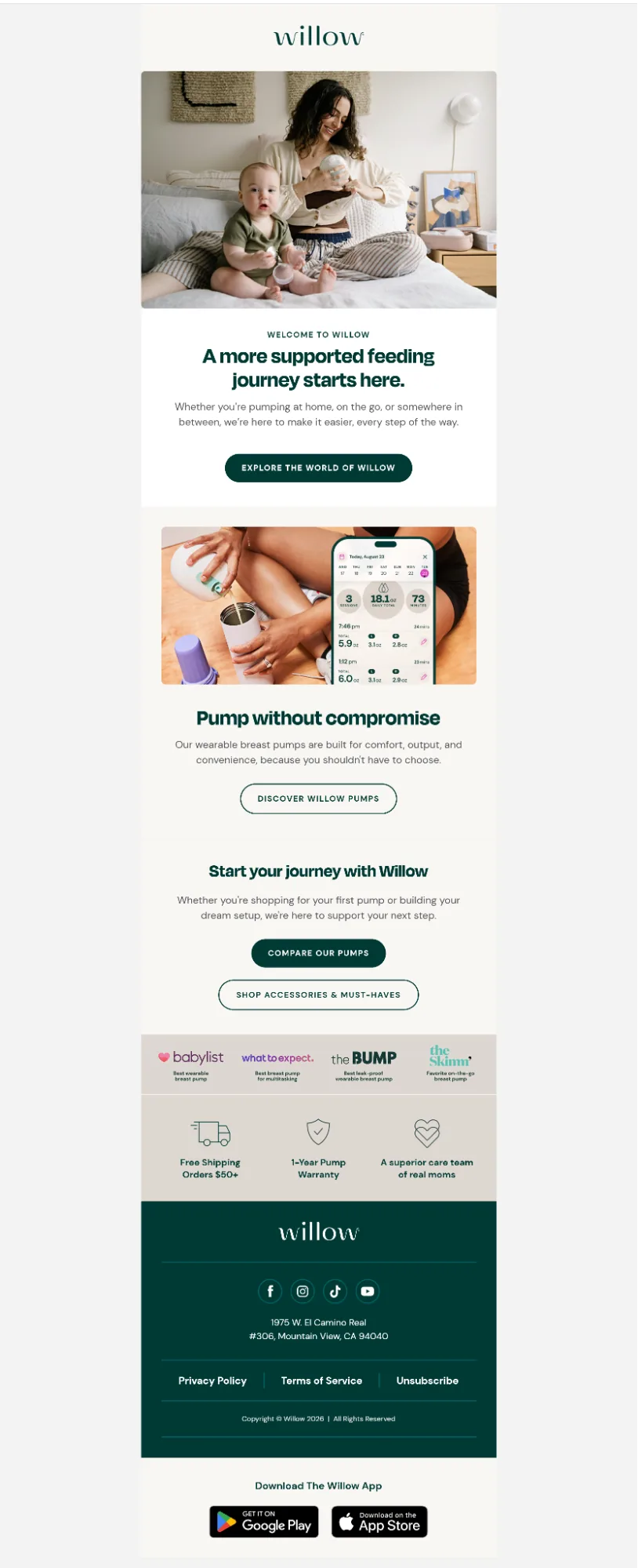
We built a 7-email welcome automation sequence for Willow, with each email serving a specific purpose. We highlighted the brand’s story, product comparisons, features, benefits, customer testimonials, and survey results.
2. Cart Abandonment Flow
Abandoned cart marketing flows trigger emails when shoppers add an item to their cart but leave before completing checkout. We send reminder emails immediately or within an hour, followed by social proof, objection handling, and a discount to encourage conversions.
Purpose: Recover revenue from shoppers who added items to their cart but didn’t check out
When to Trigger: Send within 30 minutes to 1 hour after cart abandonment.
Timing: Immediately after users abandon their cart
Number of emails:3-4 emails
Key Audience Segments: First-time vs. repeat customers and cart value
Exit rule: Subscribers exit if they complete the purchase, the cart expires, an item goes out of stock, or the sequence ends.
Note: For high-value carts, we route a separate flow with stronger incentives and personalization.
Success Metrics: Cart recovery rate, click-through rate, and revenue recovered.
Abandoned Cart Email Flow Sequence
Email 1: Cart Reminder
We send the first reminder email 30 minutes to 1 hour with actual cart content, images, and prices.
Email 2: Social proof & objection handling
Within 24 hours, we encourage purchase by addressing objections and including customer testimonials, reviews, and ratings.
Email 3: Incentive
Add a discount, free shipping, or reward to convince undecided shoppers within 48 hours.
Email 4: Urgency
A final reminder that creates urgency with a deadline running out on the cart, stock, or a reward
Best practices
- Show the actual abandoned products with high-quality images
- Keep copy focused on removing buyer’s friction
- Test where an incentive is actually needed before leading with one
Our marketing specialists kept the CTA “Secure my order” front and center for Qualia’s abandoned cart email. In addition to a quick link to return to cart, we included customer testimonials, money-back guarantee information, and product information to address potential concerns and reduce purchase friction.

3. Browse Abandonment Flow
Triggered when a known subscriber views product pages but leaves without adding anything to the cart, catching intent earlier in the funnel than cart abandonment.
Purpose: Re-engage visitors who showed interest but took no cart action.
When to Trigger: A few hours after the browse session.
Key Audience Segments: Product category
Timing: First email within a few hours of browsing.
Number of emails:2
Exit rule: Exits on cart add or purchase or no longer meets the browsing criteria for the flow.
Success Metrics: Click-through rate, conversion rate on viewed products.
Browse Abandonment Flow Sequence
Email 1: Product Reminder
Show the exact product they viewed, with a clear link back.
Email 2: Related Picks
Follow up with complementary or similar products if the first email didn’t convert.
Best Practices
Keep the tone light; this audience hasn’t shown cart-level intent yet.
Save the discount for cart or checkout abandonment; don’t lead with one here.
What to Send:
- Image and name of the exact product viewed
- Direct link back to the product page
- A few related or similar product suggestions
- Light social proof, such as a rating or customer reviews
Browse Abandonment Flow CTA: “Still Thinking It Over?” or “Take Me Back”
Runway Rogue’s browse abandonment automations encourage subscribers to take a second look at the product. We also recommend best sellers from a similar category to guide website visitors. Highlighting free shipping and financing options like Buy Now, Pay Later eases buyers’ anxiety.

4. Checkout Abandoned Flow
Triggered when a shopper enters checkout, sometimes with payment or shipping info already filled in, but leaves without completing the order. From what we’ve seen across our clients, this audience is further along than cart abandoners and typically converts higher.
Purpose: Recover high-intent shoppers who started checkout but didn’t finish.
When to Trigger: Shortly after exit from checkout without a completed order.
Key Audience Segments: Customer status (new vs. returning), cart value, and product category
Timing: First email within 1 to 2 hours; sequence runs over 24 to 48 hours.
Number of emails: 2
Exit rule: Exits on order completion or the subscriber enters another relevant purchase flow.
Success Metrics: Checkout completion rate, recovered revenue.
Checkout Abandonment Flow Sequence
Email 1: Complete Your Order
We provide a direct link back to their saved checkout; no need to re-explain the product, they’ve already decided.
Email 2: Need a Hand?
A short follow-up offering support or answering common last-step hesitations: shipping cost, payment options, return policy.
Best Practices
- Keep the first email low friction; one clear link back to checkout is enough.
- From our experience, lead helps better than discount; this audience usually needs reassurance more than an incentive.
What to Send:
- Direct link back to the saved checkout
- Order summary with cart contents
- Reassurance on shipping cost, payment security, or return policy
- Support or live chat contact option
Checkout Abandonment Flow CTA: “Finish Checking Out” or “Complete Your Order” or “View Similar Styles”
5. Post-Purchase Flow
Post-purchase flows are automated sequences triggered right after a customer completes an order; they confirm the purchase, set delivery expectations, and lay the groundwork for a second sale.
Purpose: Confirm the order, reduce buyer’s remorse, and start building toward a repeat purchase.
When to Trigger: Immediately after checkout completes.
Key Audience Segments: New customers, grouped by product category or order value.
Timing: Starts immediately and spreads across the delivery window.
Number of emails: 3 to 4
Exit rule: Subscribers exit after they place another order, cancel/refunds the order, or after the sequence completes.
Success Metrics: Repeat purchase rate, review submission rate, delivery-related support tickets.
Post-Purchase Flow Sequence
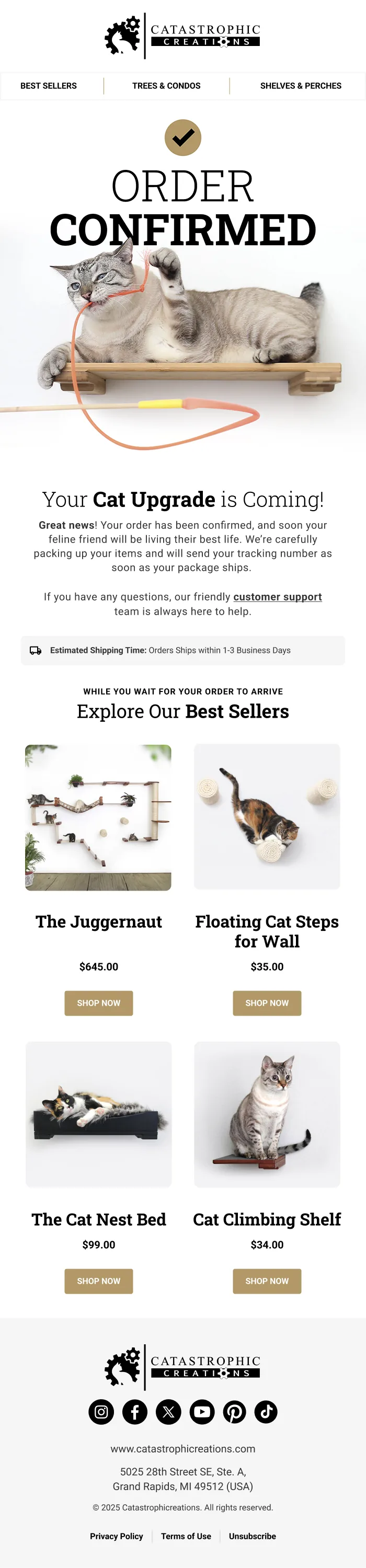
Email 1: Order Confirmation Email
Confirm the order and thank the customer right after purchase.
Catastrophic Creations’ order confirmation email gets straight to the point. Customers receive estimated shipping time and customer support details before best-seller recommendations.
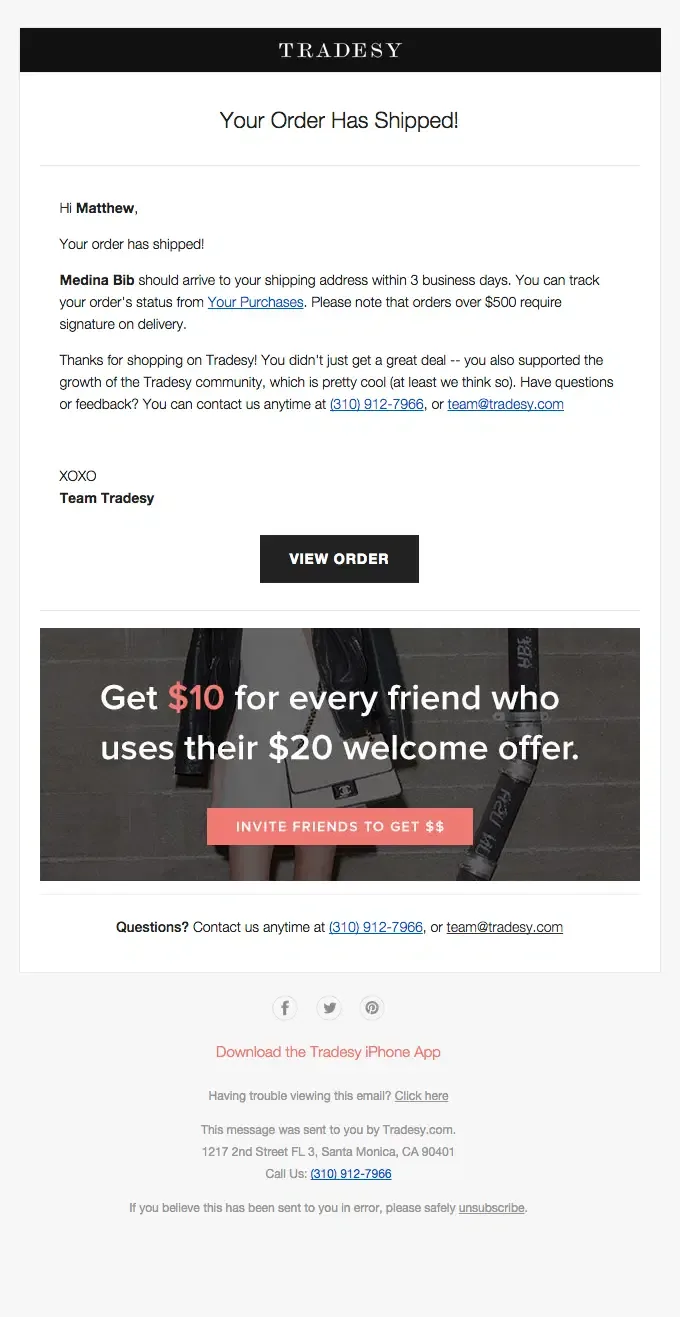
Email 2: Shipping Update
In the second email, we share tracking info and set delivery expectations within a day or two of shipment.
Email 3: Usage Tips
Help the customer get the most from their purchase once it likely arrives.
Email 4: Review Request Handoff
Ask for feedback once they’ve had time to use the product, and point toward related items.
Best Practices
- Keep the confirmation email transactional; this is not the place to sell hard.
- Time shipping updates to actual carrier data where possible.
- Use this flow to reduce support tickets.
What to Send:
- Order number and summary of items purchased
- Real-time tracking link once the order ships
- Usage tips or a getting-started guide relevant to the product
- Related product suggestions or a handoff into the review request flow
Post-Purchase Flow CTA: “Track Your Order” or “See Care Tips”
Our top priority for Purple’s post-purchase automation flow was to guide new users through using their mattress. We introduced customers to complementary products without hard selling and provided a quick link to their customer support.

Tier 2: Essential Growth Flows
Once the foundational flows are performing, we automate the email flows to increase conversion rate and purchase frequency from your existing traffic and customers.
6. Winback / Re-engagement Flow
Triggered once a subscriber or customer has gone quiet for a while, meant to bring them back before they churn off the list entirely.
Purpose: Reactivate inactive subscribers and customers.
When to Trigger: After 30, 60, or 120 days with no opens, clicks, or purchases.
Key Audience Segments: Recency, frequency, or monetary value
Timing: Triggered at the inactivity threshold, spread over two to three weeks.
Number of emails: 3
Exit rule: Exits on any engagement, unsubscribes, or after the final preference check.
Success Metrics: Reactivation rate, list health, unsubscribe rate.
Winback Flow Sequence
Email 1: We Miss You
A soft check-in, no hard offer yet.
Email 2: Incentive to Return
A meaningful reason to come back, tied to what they used to shop for.
Email 3: Final Check-In
We finally ask directly if they still want to hear from the brand; this protects deliverability for the rest of the list.
Best Practices
- Segment by past purchase category so the incentive feels relevant.
- Treat the final email as a real decision point; remove or suppress non-responders.
What to Send:
- A personal, low-pressure check-in message
- An incentive relevant to past purchase or browse history
- What’s new since they last engaged: new products, updates
- A clear preference or opt-down option in the final email
Winback Flow CTA: “Come Back and Save” or “Update Your Preferences”
These emails are simple: just tell the customer you miss them and give them the incentive to return, as we did for Olipop in their win-back email.

7. Review Request Flow
Triggered once a customer has had time to actually use what they bought, aimed at collecting reviews and user-generated content while the experience is fresh.
Purpose: Collect reviews and UGC to build social proof.
When to Trigger: 7 to 14 days after delivery, depending on the product.
Key Audience Segments: Product category
Timing: One to two weeks post-delivery.
Number of emails:1 to 2
Exit rule: Exits once a review is submitted; the order is canceled/refunded, or the maximum number of review requests is reached.
Success Metrics: Review submission rate, UGC volume, average star rating.
Review Request Flow Sequence
Email 1: Request
A direct, low-friction ask with a one-click rating option.
Email 2: Reminder
A follow-up for those who haven’t responded, sometimes with a small incentive for photo or video reviews.
Best Practices
- Make the first step a single click; save the written review for after that.
- Time the request to actual delivery data, not a flat calendar guess.
What to Send:
- Image and name of the purchased product
- One-click star rating option
- Optional field for written review or photo/video upload
- Incentive for photo or video reviews, if offering one
Review Request Flow CTA: “Rate Your Purchase” or “Share Your Experience”
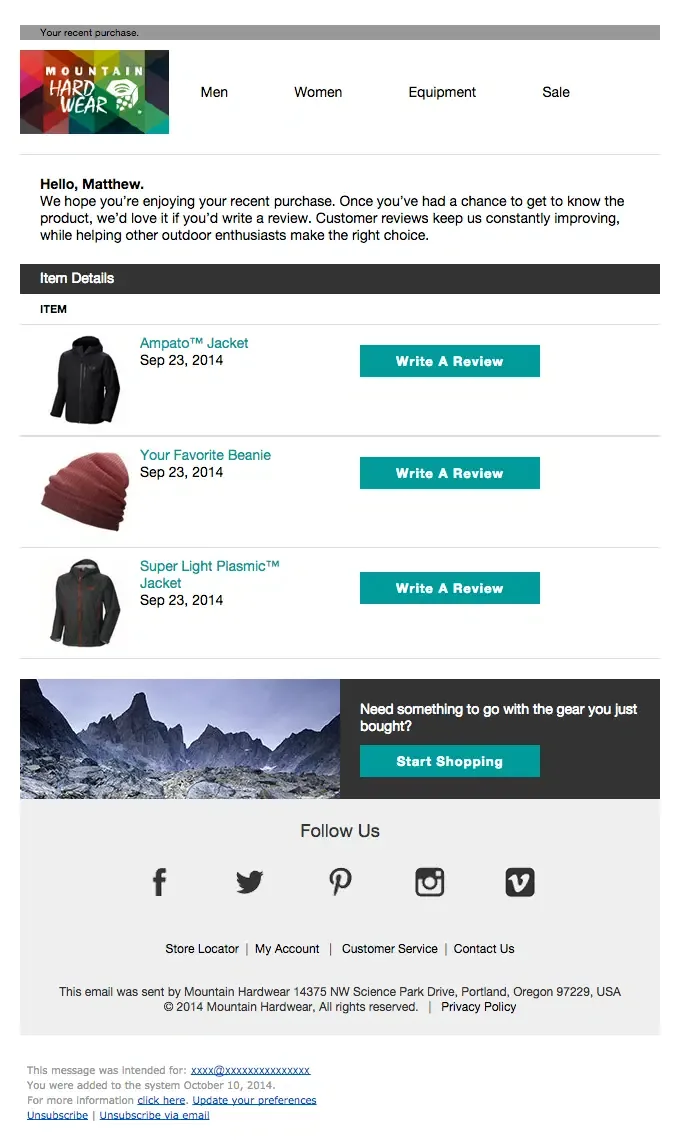
Hardwear’s review request email personally addresses the customer and specifies their purchase items. They’re just a click away from writing a review.
8. Cross-sell / Upsell Flow
Triggered shortly after a purchase, or after repeated engagement with a category, suggesting either a complementary product or a step up to a higher-value option.
Purpose: Increase order value through relevant add-ons or upgrades.
When to Trigger: Shortly after purchase, or after repeated category engagement.
Key Audience Segments: Product category
Timing: Within a few days of the qualifying purchase or engagement.
Number of emails: 1 to 2
Exit rule: Exits on the cross-sell or upsell purchase, or the sequence is completed.
Success Metrics: Upsell conversion rate, AOV lift.
Cross-sell / Upsell Flow Sequence
Email 1: Recommendation
We don’t make recommendations randomly; we ensure the follow-up products are complementary and provide value to customers.
Email 2: Reminder
We sent a reminder with social proof if the first email didn’t convert.
Best Practices
- We base pairings on real “bought together” data when available
- Frame upsells around a specific benefit or upgrade relevant to the customer.
What to Send:
- Product recommendation based on the customer’s actual purchase
- Clear reason it pairs well or improves on what they bought
- Social proof, such as a review or rating, if available
- Direct link to purchase or upgrade
Cross-sell / Upsell Flow CTA: “Complete the Set” or “Upgrade Your Experience”
The cross-sell email we built for 1st In Coffee recommended water filters, cleaning tablets, and coffee beans to Jura Coffee Machine customers.

9. Replenishment Flow
Triggered around the point a consumable product is likely running low, reminding customers to reorder before they’re actually out.
Purpose: Drive repeat purchases on consumable products.
When to Trigger: Timed to the expected depletion window for that specific product.
Key Audience Segments: Replenishment cycle
Timing: Roughly 25 to 30 days into a 30-day supply, adjusted per product.
Number of emails: 2
Exit rule: Exits on reorder, the product is out of stock, or the sequence is completed.
Success Metrics: Reorder rate, subscription conversion rate.
Replenishment Flow Sequence
Email 1: Reorder Reminder
A timely nudge based on when the product is likely running low.
Email 2: Subscribe and Save
An offer to switch to a recurring order if they haven’t reordered yet.
Best Practices
- At InboxArmy, our marketing specialists base timing on real usage data.
- We make the subscribe option easy to find; this is where a lot of long-term revenue sits.
What to Send:
- Reminder of the exact product they’re likely running low on
- One-click reorder link
- Subscribe-and-save option with the savings clearly stated
- Estimated days remaining, if usage data supports it
Replenishment Flow CTA: “Reorder Now” or “Set Up Auto-Delivery”
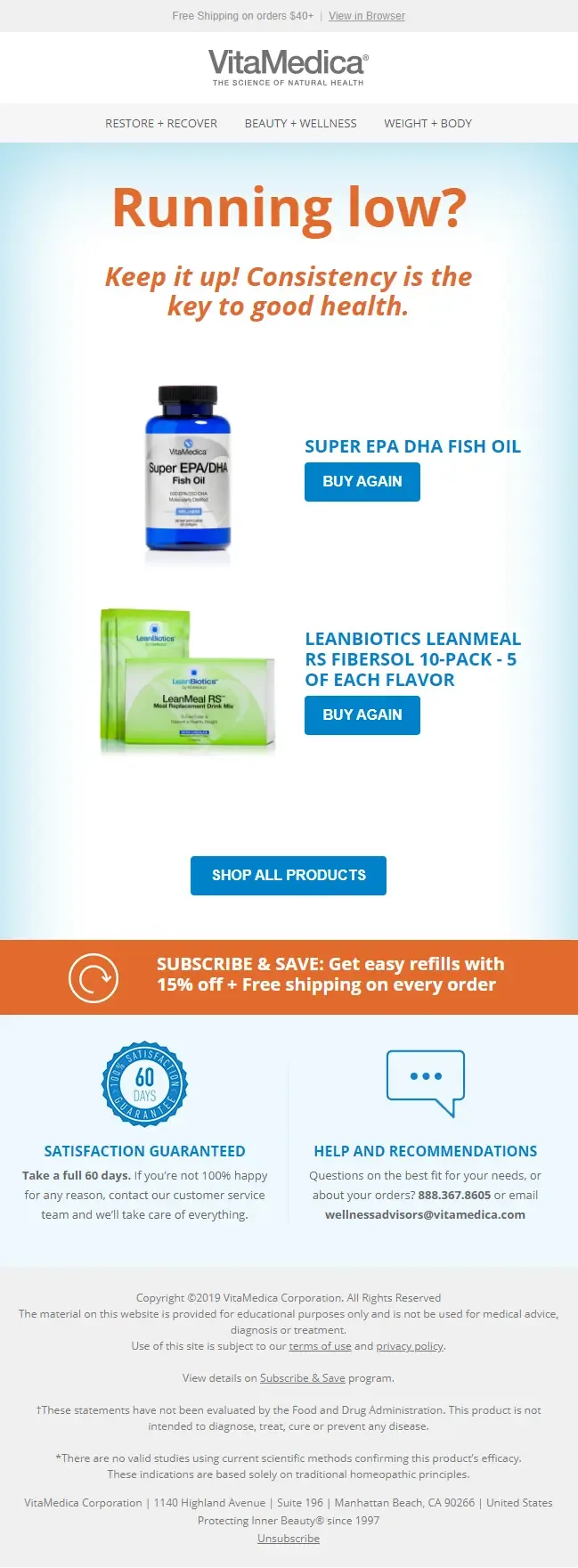
VitaMedica’s replenishment emails get triggered based on the production consumption cycle. We included high-quality product photos, direct checkout links, and transparent discounts in the reminder emails. This encourages repeat purchases and builds long-term customer relationships.
Tier 3: Advanced Ecommerce Email Flow
For the advanced tier of email flows, we lean into specific timing, customer data, and occasions to establish a deeper connection with subscribers who’ve already shown interest.
10. Back-in-Stock Flow
Triggered the moment a sold-out product comes back in stock, sent to subscribers who specifically asked to be notified; this is one of the highest-converting flows we run for clients.
Purpose: Notify subscribers the instant a wanted product is available again.
When to Trigger: When inventory is restocked for a product with active alert signups.
Key Audience Segments: Subscribers who opted into that specific product’s restock alert.
Timing: Immediately on restock.
Number of emails:1 to 2
Exit rule: Exits on purchase, or if the product sells out again.
Success Metrics: Notification-to-purchase conversion rate.
Back-in-Stock Flow Sequence
Email 1: It’s Back
Send the alert the moment stock is available.
Email 2: Limited Stock Reminder
A short urgency follow-up if the item is still available but moving quickly.
Best Practices
- Speed matters more than polish here; send immediately.
- Set expectations honestly if stock is genuinely limited.
What to Send:
- Image and name of the restocked product
- Direct link to purchase
- Honest stock level indicator if quantity is genuinely limited
- Clear, immediate CTA
Back-in-Stock Flow CTA: “Shop Now Before It’s Gone”
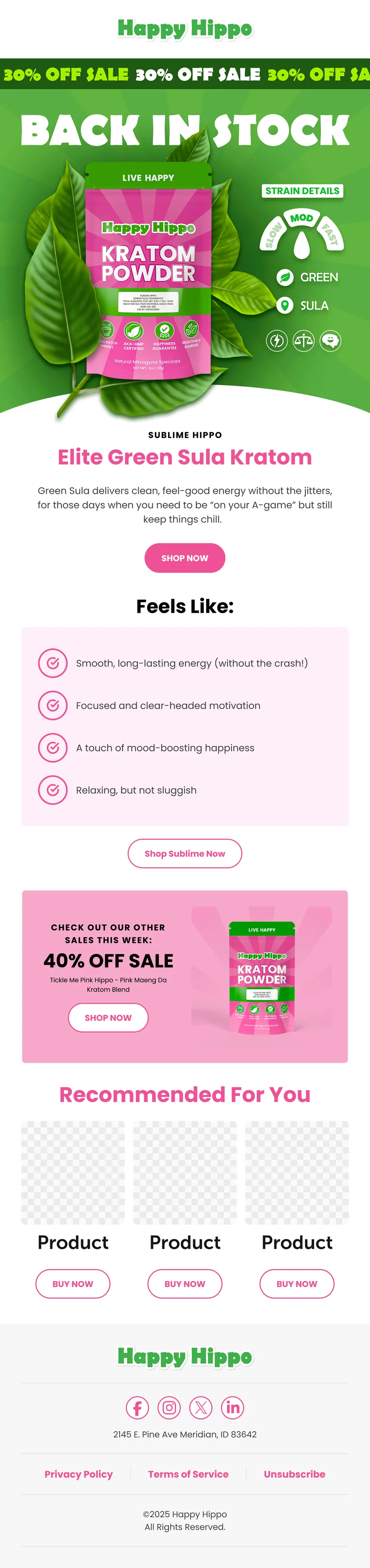
We built back-in-stock emails for Happy Hippo targeting interested customers; we capitalize on ready-to-convert leads and increase conversion. This includes a 30% discount and recommending complementary products.
11. Seasonal Promotion Flow
Scheduled ahead of key retail moments, Black Friday, back to school, summer sale, built to build anticipation and close with real urgency.
Purpose: Drive sales around a specific seasonal or holiday window.
When to Trigger: Scheduled ahead of the target date.
Key Audience Segments: Full list, or segments relevant to the specific promotion.
Timing: Pre-built and scheduled around the target date.
Number of emails:2 to 4, depending on the size of the promotion.
Exit rule: Exits once the promotion window closes, the customer purchases the promoted product, or the sequence is over.
Success Metrics: Revenue during the promotion window, conversion rate, list engagement.
Seasonal Promotion Flow Sequence
Email 1: Heads Up
Let subscribers know the sale is coming.
Email 2: Sale Live
Announce the promotion is active.
Email 3: Reminder
Nudge those who haven’t shopped yet.
Email 4: Last Chance
Final urgency push before the window closes.
Best Practices
- We plan and schedule this flow well ahead of the date.
- Suppress subscribers who’ve already purchased during the promotion from later urgency emails.
What to Send:
- Clear promotion dates and offer details
- Featured products or categories included in the sale
- Countdown or urgency messaging as the window closes
- Suppression of subscribers who’ve already redeemed the offer
Seasonal Promotion Flow CTA: “Shop the Sale” or “Don’t Miss Out”
Sok It season flow for summer offers tropical product selections and a 40% discount offer taking center stage. We included a clear deadline and mystery reward to create curiosity and urgency.

12. Birthday / Anniversary Flow
Triggered around a personal date, a birthday, a signup or purchase anniversary, built to feel personal rather than like a mass send.
Purpose: Build emotional connection and drive a purchase around a personal milestone.
When to Trigger: On or shortly before the subscriber’s birthday, or their signup or purchase anniversary.
Key Audience Segments: Engagement level, customer tier.
Timing: A few days before the date, with the offer live through the date itself.
Number of emails:1 to 2
Exit rule: Exits after send, re-triggers the following year.
Success Metrics: Open rate, conversion rate, offer redemption rate.
Birthday / Anniversary Flow Sequence
Email 1: Celebration
A personal note marking the occasion, with an offer if you’re including one.
Email 2: Reminder
A short follow-up if the offer hasn’t been redeemed yet.
Best Practices
- We keep the tone personal; our subscriber response shows emails work best when it doesn’t feel like a mass send.
- Give the offer a defined window so it creates a reason to act now.
What to Send:
- Personalized greeting referencing the specific occasion
- Offer or gift, with a clearly stated expiration date
- Product suggestions if relevant to the occasion
Birthday / Anniversary Flow CTA: “Celebrate With a Gift” or “Claim Your Birthday Offer”
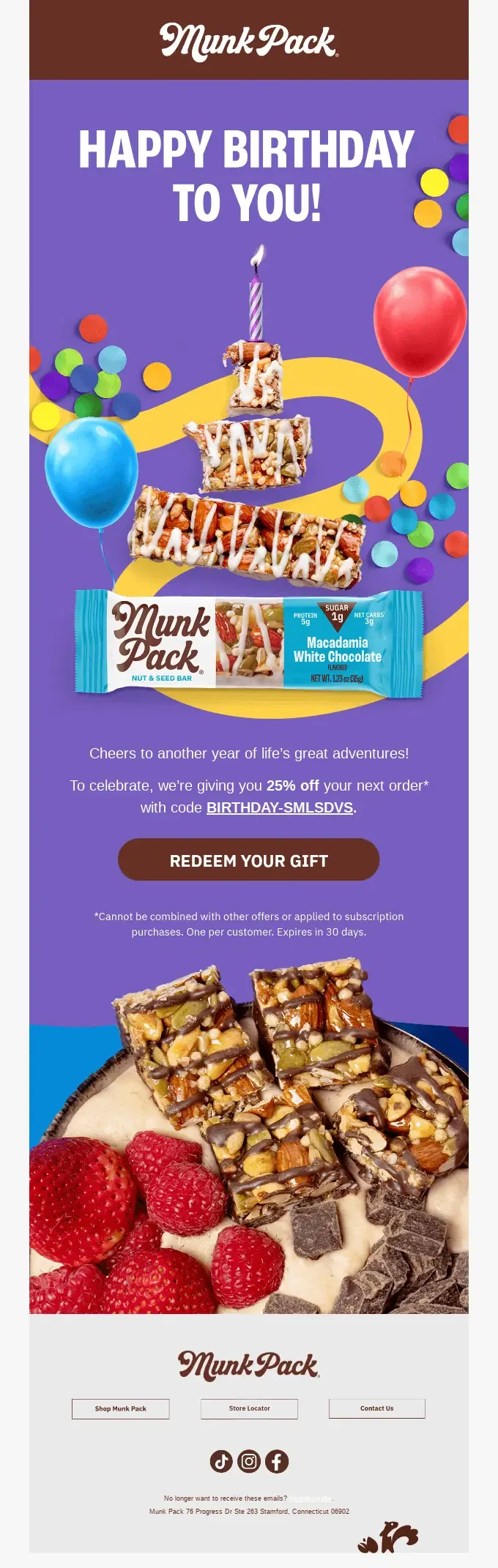
Munk Pack celebrates subscribers’ birthdays with a 25% discount on their next purchase; they’re not trying to push any products.
13. VIP / Loyalty Program Flow
Triggered when a customer crosses a spend, order count, or tier threshold, recognizing your highest-value customers in a way that references what they’ve actually done to earn it.
Purpose: Recognize and reward top customers to reinforce loyalty.
When to Trigger: When a customer crosses a spend, order count, or loyalty tier threshold.
Key Audience Segments: Top-spending or most frequent customers, loyalty program members.
Timing: Triggered at the threshold, again at future milestones.
Number of emails: 1 to 2 per event
Exit rule: Exits after send, re-triggers at the next tier or milestone.
Success Metrics: VIP retention rate, AOV among VIPs, program enrollment and redemption rate.
VIP / Loyalty Flow CTA: “See Your Perks” or “Shop Your Exclusive Access”
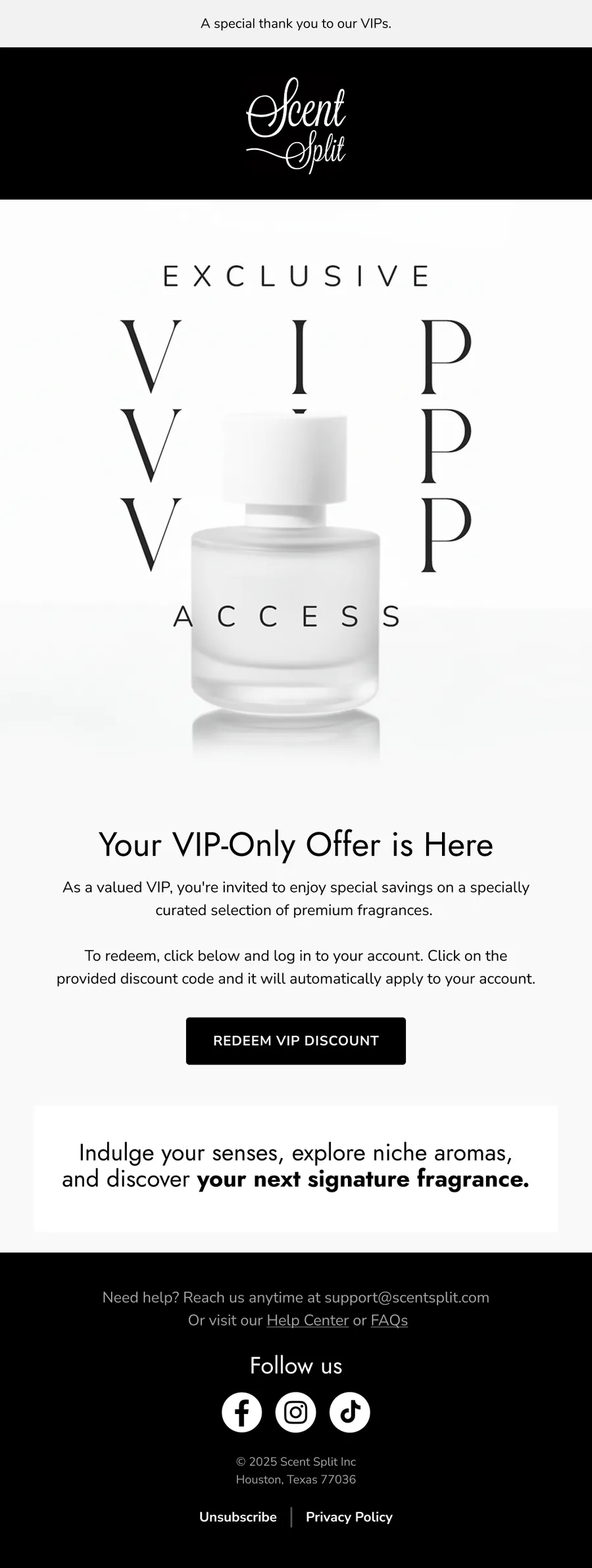
The VIP emails we automated for Scent Split feature exclusive discounts for priority customers without hard-selling fragrances.
How To Set Up Ecommerce Email Flow
Before building an email flow, we establish the trigger, identify the target audience, and define the preferred outcome. For example, an email signup triggers a welcome series, and the goal is to introduce new subscribers to the brand.
Choose a Platform and Connect Your Data: We select an ecommerce-focused email marketing platform, such as Klaviyo, Omnisend, Mailchimp, ActiveCampaign, or Drip. We ensure ESPs seamlessly integrate with ecommerce platforms like Shopify or WooCommerce so we can build email marketing automations around customer and product data.
Frequency & Cadence: If it’s not a single email marketing automation, we decide how many emails and how often.
Branching Logic: We have specific “if/when” rules based on subscriber behavior to guide them through email workflows.
Exit Condition: Subscribers can exit a workflow because we achieved our goal (conversion, retention, or review) or because they opted out (inactive, unsubscribed, or bounced)
How To Measure Email Flow Performance
We track ecommerce email marketing flows’ performance by monitoring engagement and revenue metrics, such as click rate, click-to-open rate, conversion rate, revenue per recipient, etc. Depending on the automation goal and industry, the key performance indicators and healthy benchmarks vary.
| Ecommerce Email Flows | Relevant KPIs |
| Welcome | Click rate, revenue per recipient, time-to-first-purchase |
| Cart Abandonment | Cart recovery rate, revenue recovered per email sent, click-through rate |
| Post-Purchase | Repeat purchase rate, click rate, time-to-second-purchase |
| Checkout Abandonment | Checkout completion rate, recovered revenue |
| Browse Abandonment | Click-to-cart rate, conversion rate, revenue per recipient |
| Win-Back | Reactivation rate, revenue per recipient, list suppression rate |
| Review Request | Review submission rate, click-to-review page rate, average rating |
| Back-in-Stock | Revenue per recipient, speed-to-purchase, waitlist opt-in rate |
| Cross-sell/Upsell | Conversion rate, AOV lift, click rate |
| Replenishment | Repurchase rate, click-to-purchase rate, revenue per recipient |
| Seasonal Promotional Flow | Revenue during the promotion window, conversion rate, list engagement. |
| VIP/Loyalty | VIP purchase frequency, VIP AOV |
| Birthday Anniversary | Conversion rate, revenue per recipient |
Best Practices For Ecommerce Email Marketing Flows
Ecommerce email marketing automation uses customer and product data to reach subscribers with timely and relevant content. It drives sales, saves time, and builds customer loyalty through continuous engagement.
- Segment by Behavior: We group customers using real-time data like purchase history, interested product category, average spend, and browsing signals so the email matches actual intent.
- Tailor Recommendations: We align product data with customer preferences to offer customized upsell and cross-sell recommendations.
- Keep Lists Clean: Regularly removing hard bounces and inactive subscribers from the email list is vital to maintain sender reputation and deliverability.
- Review & Update: For all our ecommerce email marketing automations, we monitor performance from conversion rates to click-through rates to unsubscribe trends monthly or quarterly.
- Optimize Delivery Windows: Most ESP platforms offer this feature to send emails during peak engagement hours of individual customers.
- High-Intent Reminders Immediately: From what we’ve seen across our flows triggered by strong purchase signals, such as cart abandonment, speed matters.
- Suppression strategy: We build exit conditions and suppress contacts so customers don’t get bombarded with irrelevant emails.
- Avoid Overlapping Automations: Consumers landing in two flows at the same time can trigger unsubscribes.
- Coordinate email marketing automation with Other Channels: Our email marketing efforts time messaging with SMS and push notifications so conflicting information doesn’t confuse customers.
At InboxArmy, we specialize in helping clients identify and implement the most profitable automations for their businesses. Contact our ecommerce email marketing agency to enhance your email marketing ROI. We work closely with businesses to optimize existing email flows and recommend new strategies that align with their objectives.
Frequently Asked Questions (FAQs)
Should I always add discounts in my ecommerce email flows?
While adding discounts to your automated email workflows can certainly incentivize purchases and drive conversions, it’s essential to use them strategically. Consider offering discounts as part of specific campaigns or to targeted customer segments to maximize their impact. However, be mindful of over-reliance on discounts, as this can train customers to expect discounts regularly, which may impact your profitability in the long run.
What is the best email marketing automation tool for ecommerce?
Popular email marketing automation tools for ecommerce include Klaviyo, Omnisend, Mailchimp, and ActiveCampaign, which are renowned for their robust features and user-friendly interfaces. Each specializes in unique capabilities, so it’s important to identify your specific needs and preferences. Consider factors like integration capabilities, segmentation options, and reporting features to select the tool that best aligns with your business goals.
What is the difference between email flows and drip campaigns?
Email drip campaigns follow a predetermined sequence of emails, typically scheduled at specific intervals, and require minimal intervention once set up. For example, a product launch drip campaign may consist of three emails sent out at predetermined times.
In contrast, automated email flows are dynamic and triggered by specific user actions or behaviors. For instance, if a user abandons their cart, an automated email reminder is automatically triggered, prompting them to complete their purchase. This dynamic nature allows for personalized and timely communication tailored to individual user interactions.
Can small ecommerce stores use email flows?
Even small stores can benefit from email marketing automation. Staying in touch with subscribers throughout their buying journey has generated revenue for our ecommerce clients of all sizes. We recommend giving priority to high-intent automations like welcome, cart abandonment, and browse abandonment, and post-purchase emails before adopting complex workflows.