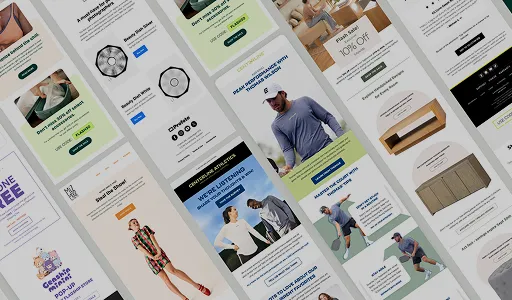

Quick Overview
A successful Black Friday email program runs from a teaser about two weeks before Black Friday through Cyber Monday and uses five core sends: teaser, early access, launch, reminder, and last chance. Segmenting the list by engagement and purchase history, building one clear offer per email, and designing for mobile with a single primary button drive the strongest results. Abandoned cart flows, personalized recommendations, and real deadlines recover revenue and keep urgency credible, while authenticated sending protects deliverability during the year’s heaviest inbox traffic. Track conversion rate, click-through rate, revenue per recipient, and average order value rather than open rate.Why Black Friday Email Marketing Matters
Black Friday email marketing matters because email reaches subscribers who have already chosen to hear from your brand, right when they are ready to buy.
Shoppers spend heavily online: In 2025, Cyber Week brought in $44.2 billion in U.S. online sales, and Black Friday alone reached a record $11.8 billion.
Early deals win the demand: Black Friday growth outpaced Cyber Monday for the second holiday season in a row, because shoppers embraced early, competitive deals. Brands that email before the final weekend capture that demand first.
Email returns more than most paid channels: Email returns between $36 and $42 for every $1 spent, according to Litmus, the DMA, and Omnisend research.
Inbox competition peaks: Every brand sends at once, so planning, segmentation, and deliverability decide whose email gets opened.
High-Converting Black Friday Email Sequence
Effective, high-converting Black Friday email sequences include teaser, early access, launch, engagement, and last-chance emails.
| Send Time | Content | |
|---|---|---|
| Teaser Email | One or two weeks before Black Friday | Build anticipation with upcoming offers, sale start date, or early access sign-up. |
| Early Access Email | 1 to 2 days before Black Friday | Exclusive offers and sale for VIP and loyalty members. |
| Black Friday Launch Email | Black Friday morning | Top products, discounts, and clear CTAs. |
| Follow-up/Reminder Email | Across the weekend | Bestsellers, customer testimonials, and sale end date. |
| Last Chance Email | Sunday night into Cyber Monday | Hard deadline and repeat offers before transitioning into Cyber Monday emails. |
Email 1: Teaser Email
Build anticipation and tell subscribers when the sale starts without encouraging them to buy early.
Email 2: Early Access / VIP
Reward repeat customers or VIP list members with exclusive early access to your sales.
Email 3: Black Friday Morning (Launch)
Send your main announcement early with a clear offer, primary call-to-action (CTA), and link to top products.
Email 4: Follow-up/Reminder Emails
Follow up with social proof (testimonials or reviews), low-stock alerts, or daily drops.
Email 5: Last Chance Emails
Send a hard-deadline expiration notice before transitioning into Cyber Monday offers.
16 Black Friday Email Examples
Black Friday emails cover pre-launch teasers, launches, product recommendations, discounts, and post-launch reminders.
Phase 1: Pre-launch Email Examples
1. Black Friday Teaser Email
A Black Friday teaser email hints at the sale without revealing the full offer. Subscribers get the sale date and what kind of deal is coming.
At InboxArmy, we have seen teaser or save-the-date emails build anticipation among subscribers. We created a promotional Black Friday teaser email for London Store to announce that the sale is coming without releasing the full offer.
Why we love it:
- We curated a fashion brand-led shopping experience for subscribers instead of going for a generic product grid.
- During high-volume shopping periods like Black Friday, we reassure shoppers about practical considerations like shipping, returns, payment options, and customer care support.
- From our experience, segmenting engaged subscribers or a loyal customer base first helps, because early opens improve inbox placement for the heavier sends that follow.
What to adopt:
- State your maximum discount in the teaser and show the brands or categories that will be included, as we did here.
- Add a trust bar with reviews, assurances, security badges, and support promises to settle these promises before launch day.
- We used consistent and noticeable ‘Shop Now’ CTAs across the email, so it was obvious to subscribers what the next step is.

Don’t Wait for Black Friday Email
A “don’t wait” email pulls a deal forward so brands can reach shoppers before the Black Friday crowd arrives. We highlight the discount, the end date, and give them a genuine reason to shop early.
Just because every business has a holiday sale doesn’t mean you have to follow the same template. We curated a special Black Leather Thursdays Sale for Thursday Boots Company before the holiday shopping rush.
Why we love it:
- The name Leather Thursdays belongs only to Thursday Boots, so no competitor’s sale can be mistaken for it.
- A free gift with purchase protects the brand’s pricing and still gives shoppers a deadline to act on.
- Under “These Are Going Fast!”, we placed six limited-inventory products to instil credible urgency and scarcity
What to adopt:
- Name your sale after your brand, a signature product, or a day that belongs to your business. A memorable event name separates your email from other Black Friday sends and lets you choose your own dates.
- Free shipping, gifts, and any other shopping perks get the spotlight.
We placed the first “Shop Now” button directly under the gift offer, so subscribers can act with minimal effort. “Shop the Collection” follows the product section, and “Shop Men’s,” “Shop Women’s,” and “Shop Accessories” close the email so every reader has a relevant final click.

Black Friday Early Access Email
An early access email gives a chosen group first access to the sale. VIP customers, loyalty members, and SMS subscribers are apt audiences for this.
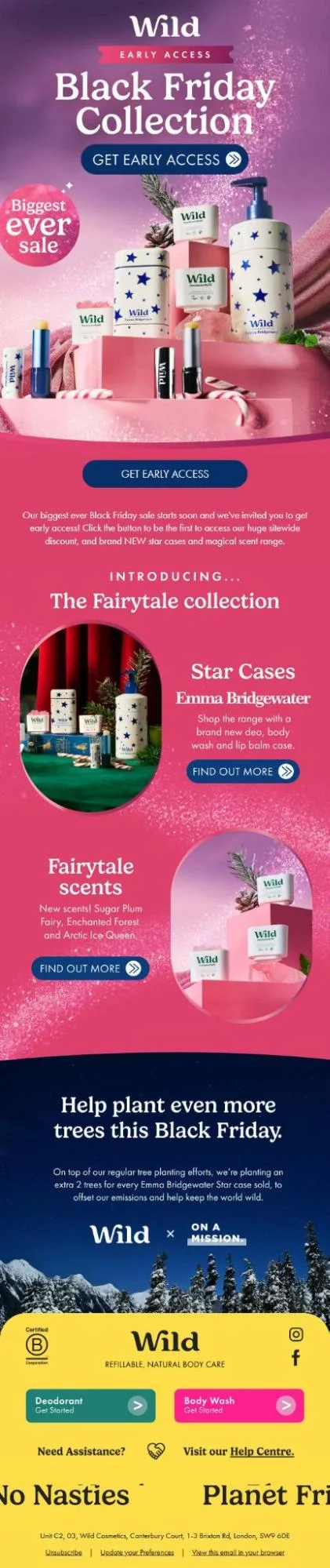
From our experience, an invitation works best when subscribers get something new to unlock along with the discount. We designed an early access email for Wild that opens its biggest sale to selected subscribers and introduces a new Fairytale collection at the same time.
Why we love it:
- We placed the “Get Early Access” button in the hero and again after the opening paragraph, so subscribers never scroll far to act.
- Anything new works wonders for engagement; that’s why we introduced the Fairytale collection, so the invitation offers new products as well as savings.
- We added a tree-planting section that promises two extra trees for every star case sold, giving values-driven shoppers a second reason to buy.
What to adopt:
- Pair your early access window with a product or range that subscribers cannot get later, so the invitation carries value beyond price.
- Repeat the access button after your first paragraph so the click point stays within reach.
- Tie a cause commitment to a specific product, so shoppers see exactly what their purchase adds.
- Keeping the exact percentage out of the email gives subscribers a reason to click through.
For Wild’s email, we used “Get Early Access” in the hero and after the intro, then “Find Out More” on each collection block so readers can explore before they click through.
Black Friday Save-the-Date Email
A save-the-date email tells subscribers when the sale starts and ends. The copy lists the dates, the start time, and one line about what to expect.
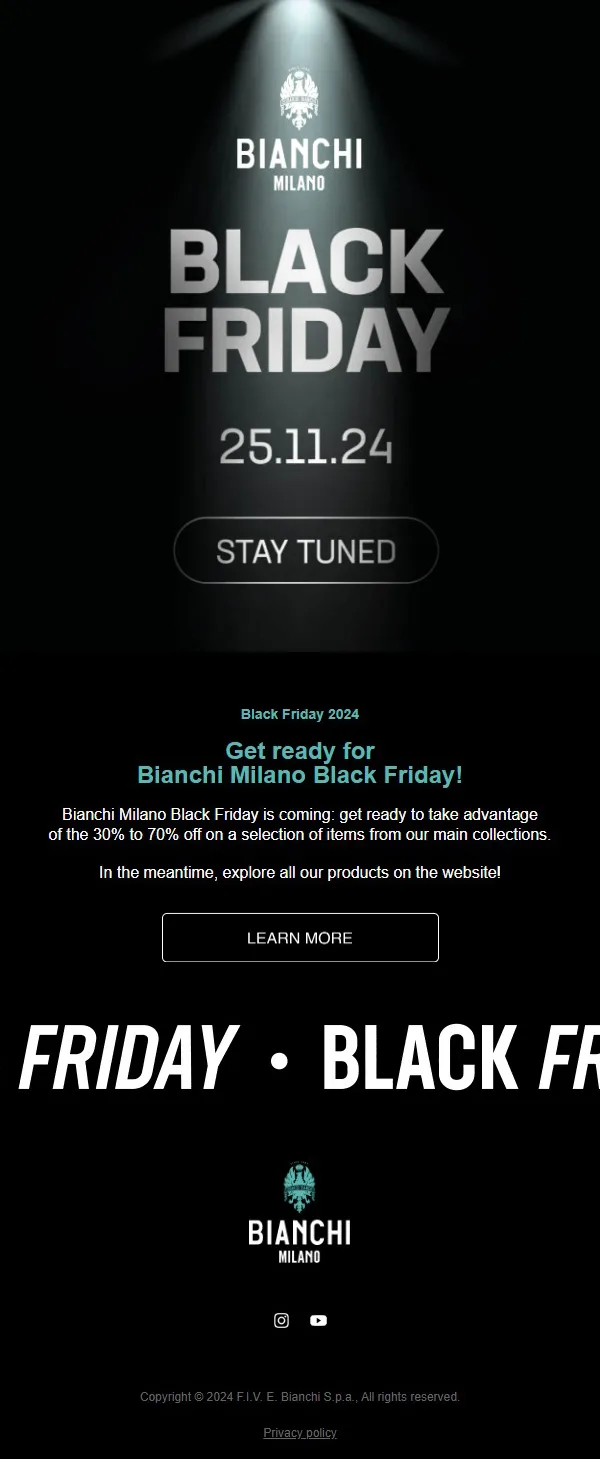
Sometimes the date is the entire message. We created a save-the-date email for Bianchi Milano that places 25.11.24 at the center of a dark hero, lit by a single spotlight.
What we love:
- We made the date the largest element after the event name, so subscribers read the key fact in a second.
- The email states a 30% to 70% discount range on selected items from the main collections; we set expectations without listing products.
- A “Learn More” button sends subscribers to the website to browse before the sale opens.
What to adopt:
- Brands can include a calendar link that works on Google, Apple, and Outlook.
- Any specific products or offers the sale will include to build anticipation.
- State your discount range so subscribers can judge whether the sale is worth waiting for.
A“Stay Tuned” button with the date and a “Learn More” button under the copy.
Phase 2: Black Friday Promotional Email Examples: Drive Sales
Black Friday Sale Announcement Email
An announcement email states the offer and what it covers in the first few lines.
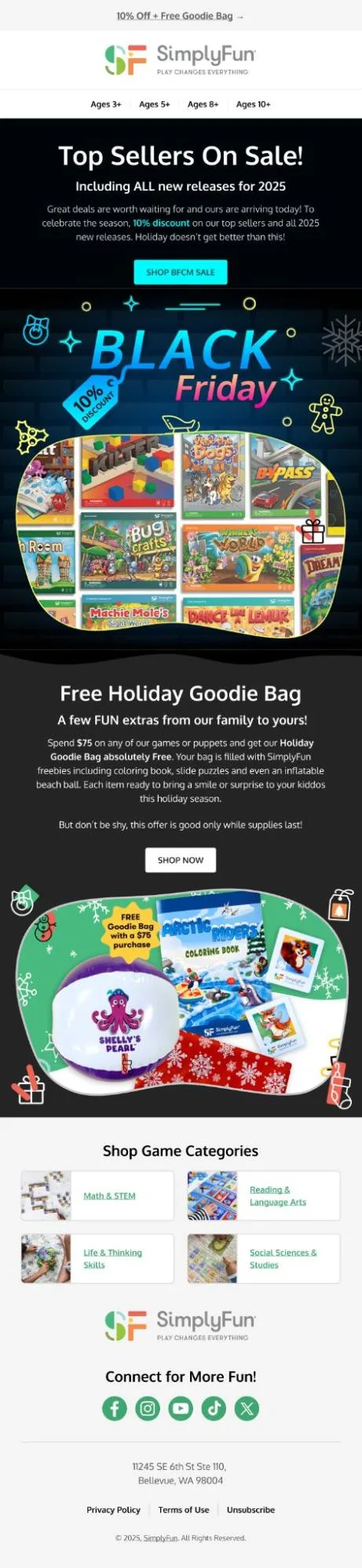
A modest discount needs a sweetener. For SimplyFun, we announced a 10% sale on top sellers and all 2025 new releases and added a free Holiday Goodie Bag at $75.
Why we love it:
- We put “10% Off + Free Goodie Bag” in the announcement bar, so both offers appear in the first line a subscriber sees.
- The goodie bag’s content is revealed in the email so the gift has visible value.
- Our email includes “while supplies last” in the gift section to create urgency without extra words.
What to adopt:
- When your discount is small, attach a gift at a spending threshold and put both offers in your announcement bar.
- Set the gift threshold slightly above your average order value, as we did at $75.
- Organize your navigation around the way customers shop, such as age or skill, instead of your internal product categories.
We placed “Shop BFCM Sale” under the discount announcement and “Shop Now” under the goodie bag offer, then added category cards at the bottom for readers who want to browse.
Daily Black Friday Deals Email
A daily deals email features one new offer each day of the sale. The copy names that day’s deal and shows when it expires.
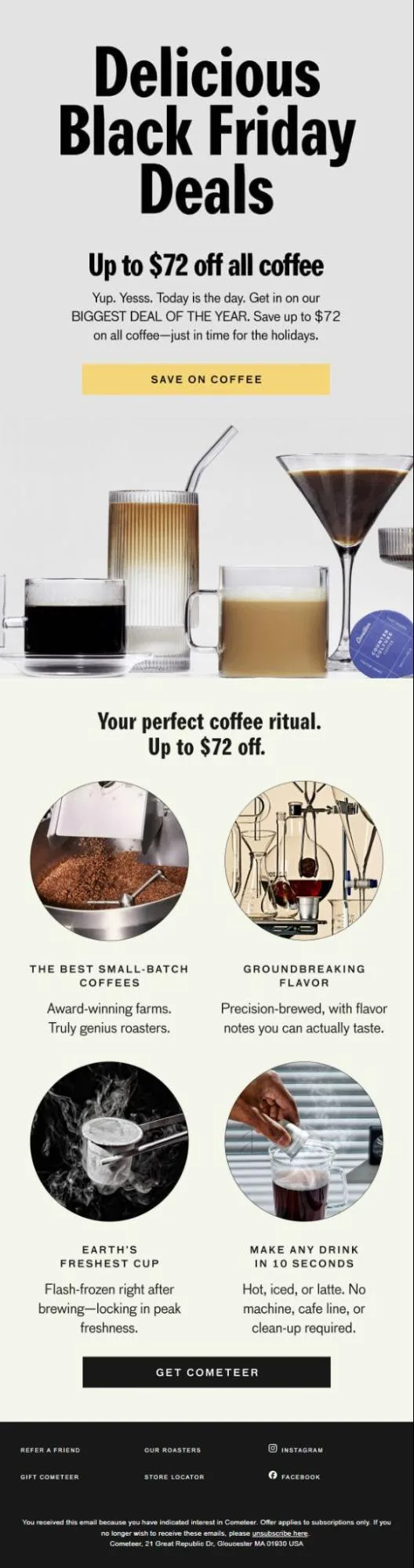
Daily deals depend on templates that can be reused without a redesign. We built Cometeer’s Black Friday email around one number: up to $72 off all coffee.
Why we love it:
- The $72 figure gets repeated, so the offer registers twice before the first scroll ends.
- We kept the content conversational and created a day-of urgency without a countdown.
- Our email includes product benefits below the offer, which lets new subscribers learn why the coffee is worth buying while returning customers click straight through.
- A layout that depends on one deal and one action swaps cleanly from day to day, since only the product, price, and expiration change.
What to adopt:
- Build the daily template once, and write down which three fields change each day.
- If the discount applies only to subscriptions, say so in the body copy near the offer, because a condition found at checkout costs trust.
- Put product proof under the button, so the offer leads and the explanation supports it.
“Save on Coffee” follows the opening offer and “Get Cometeer” closes the benefits section, so both buttons lead to the same deal at different stages of the read.
Free Gift Black Friday Email
A gift email offers a bonus item when the order meets a set condition. From our experience, a gift often moves shoppers more than a small discount because it has clear, tangible value.
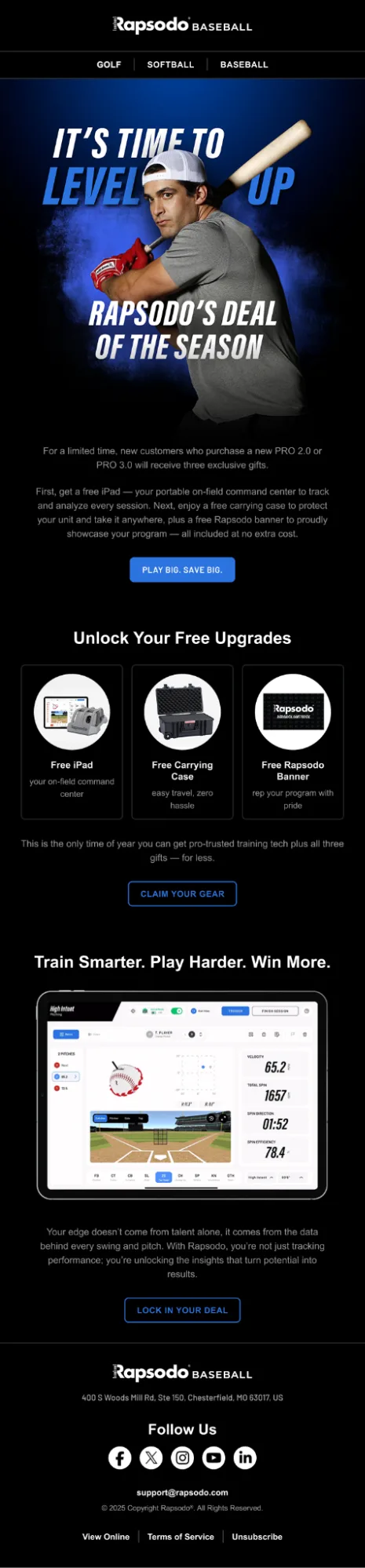
Gifts carry the most weight when they complete the main product. Our Black Friday email for Rapsodo gives new PRO 2.0 and PRO 3.0 buyers three free items.
Why we love it:
- We made the gift part of the product’s daily use.
- Each of the three gifts has its own card, so a buyer can decide which one tips the purchase.
- The qualifying products (PRO 2.0 and PRO 3.0) appear in the first paragraph, so readers know what to buy before they read about the gifts.
- Our email hints at “the only time of year,” so Black Friday is the single window for the full bundle.
What to adopt:
- Choose gifts that raise how often or how well customers use the main product.
- State the qualifying purchase in the opening lines, so the condition never surprises anyone.
- For high-ticket products, show the gift’s value alongside the product’s value.
Three CTA buttons follow three different proof points (the offer, the gifts, and the dashboard), which gives subscribers a click at each stage of the scroll.
Personalized Product Recommendation Email
This email recommends products based on each subscriber’s browsing and purchase history.
A featured block works hardest when it tells the shopper how much they save. For Line Friends, we built a four-item block that shows the depth of the sale.
Why we love it:
- Discounts of 30%, 40%, 60%, and 70% across the four items show shoppers the range of savings at a glance.
- We placed the sale price beside the original, so subscribers can see a tangible difference and savings without opening the page.
- If we have a deadline, we give it priority by putting the sale dates under the headline, which gives the event a clear start and end.
- The free shipping bar, set at orders above $75, has shown that when shoppers have a spending target, they buy more.
- A pop-up event at the Los Angeles store extends the email to shoppers who prefer to buy in person.
What to adopt:
- Fill the featured block from each subscriber’s browsing and purchase data, with a bestseller fallback for anyone without activity.
- Use a free shipping threshold as a basket-size lever, and place it where subscribers see it first.
- If you run stores, add an event or hours block so the email supports foot traffic.
“Shop & Save Big” opens the sale, “Buy Now” sits under each item, and “Click Here for More Details” serves the store event.

VIP and Loyalty Rewards Email
A loyalty email thanks top customers and offers a reward unavailable to the general list. Loyal customers respond to recognition as much as they respond to price.
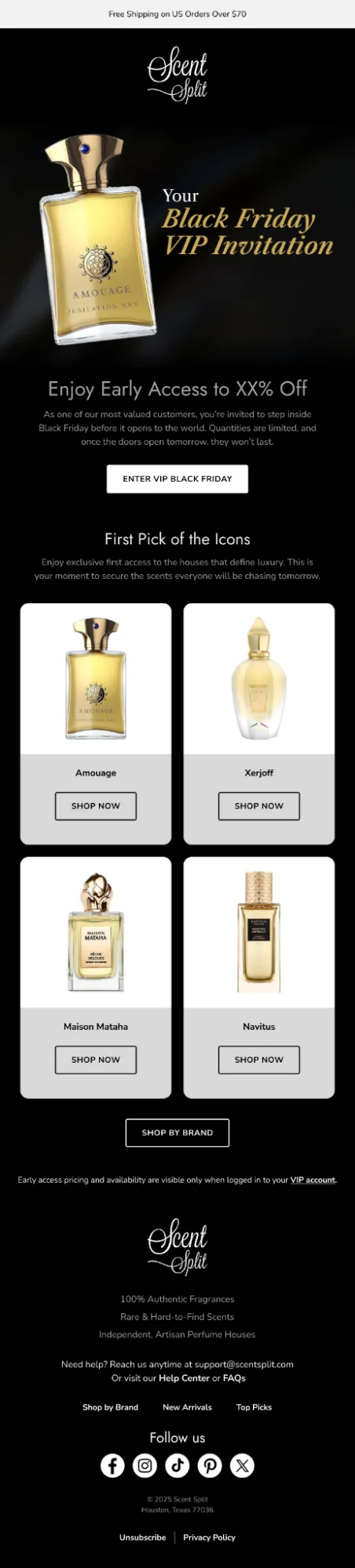
VIP emails succeed when the reader can tell exactly why they were chosen. We designed Scent Split’s invitation to give that reason, a timeline, and a scarcity line in a single paragraph.
Why we love it:
- We used “most valued customers,” “doors open tomorrow,” and “quantities are limited” to cover the reason, the timing, and the stakes in three short phrases.
- Our email includes early picks from the most sought-after houses (Amouage, Xerjoff, Maison Mataha, Navitus), so VIPs see the products they are most likely to want first.
- A free shipping threshold is an essential addition to most of our promotional emails to encourage buyers to add more products to their cart.
What to adopt:
- Add the member’s tier or points balance as a dynamic field if your platform stores it, since a live number makes the invitation personal.
- Choose the products you feature for VIPs based on demand
- Gate your VIP pricing behind a login when your platform allows it.
“Enter VIP Black Friday” frames the click as entering a members-only space, and “Shop Now” on each brand tile takes collectors straight to the labels they follow.
Black Friday Bundle and Volume-Discount Email
A bundle email offers a better price when a customer buys more than one item. Each tier gives the shopper a reason to add one more item.
Two clear tiers let a shopper decide how far to go. We built Sok-It’s Black Friday email around 40% off sitewide or 50% off when they buy 10 or more.
Why we love it:
- In our bundle email, we placed the two offers side by side, letting shoppers compare the tiers and see what extra items they would earn.
- “Go Big. Gift Bigger.” gives the 10-item tier a purpose; we give customers a reason to buy sleeves for friends and family.
- We grouped designs by theme (holiday prints, everyday prints, statement prints), which makes a 10-item cart feel like curating, so reaching the threshold is easier.
What to adopt:
- Write each tier in plain numbers, such as “40% off, or 50% off when you buy 10 or more.”
- Give your top tier an occasion, like gifting, so shoppers have a reason to reach it.
- Organize products into themes, which turns a bundle purchase into a browsing activity.
CTA: CTA: “Shop Black Friday Now” leads the hero, and a “Shop Now” button under each theme sends readers to the collection

Part 3: Black Friday Reminder and Last-Chance Email Examples
Low-Stock and Limited Availability Email
A low-stock email tells subscribers that a popular item is almost gone. The copy names the product and states the remaining quantity or size availability.
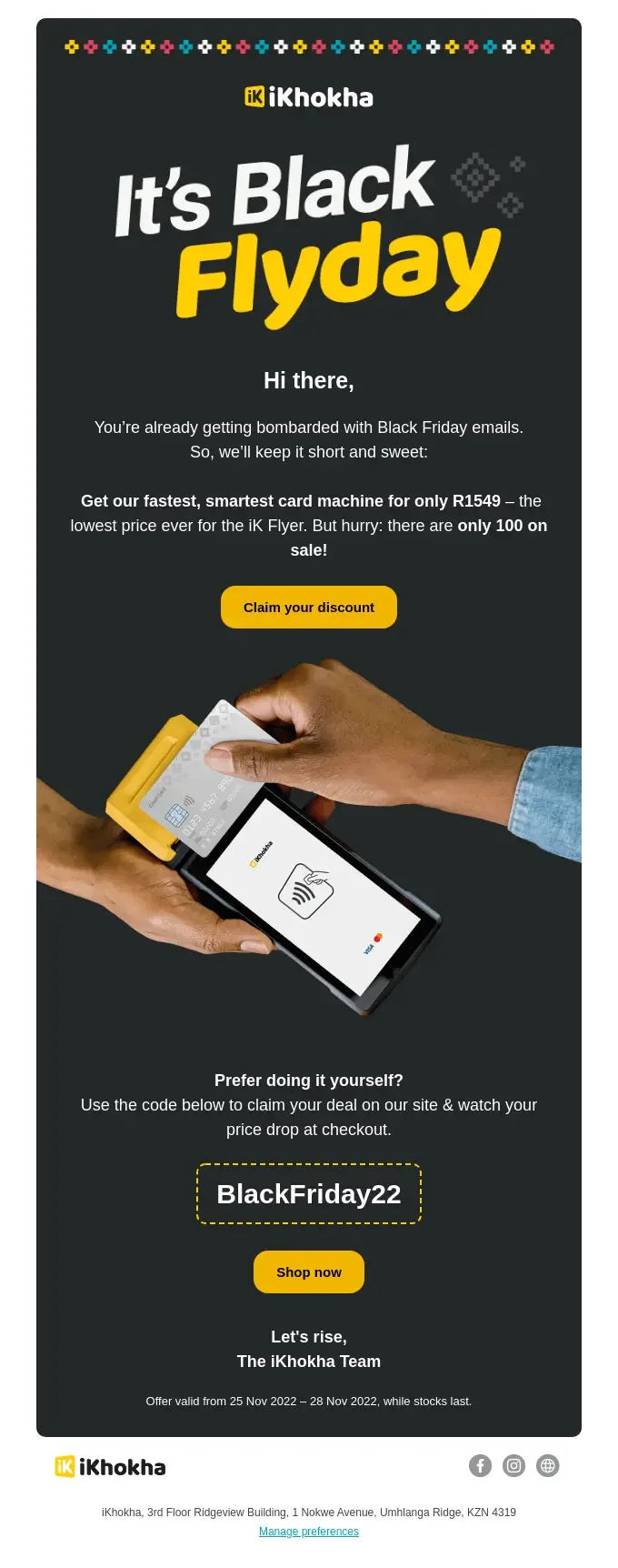
Inboxes are full of sale messages by Black Friday. For iKhokha, we wrote an email that says so and then keeps its promise to be short.
Why we love it:
- Our email focuses on one product, one price, and one scarcity fact (only 100 on sale), so readers can decide in seconds.
- We encourage subscribers to claim the deal through a button or apply a code on the site, which suits both quick buyers and careful ones.
- We state offer dates plainly at the bottom, which keeps the scarcity claim believable.
What to adopt:
- Connect the quantity in your email to live inventory so the number stays true as the sale continues.
- Offer both a button and a code, because some shoppers prefer to enter the discount themselves.
- Hold your copy to one product, one price, and one deadline.
CTA: CTA: “Claim your discount” serves buyers who want the offer applied for them.
Black Friday Last Chance Email
The last chance email announces that the sale ends soon. The copy states the exact end time and the offer one final time.
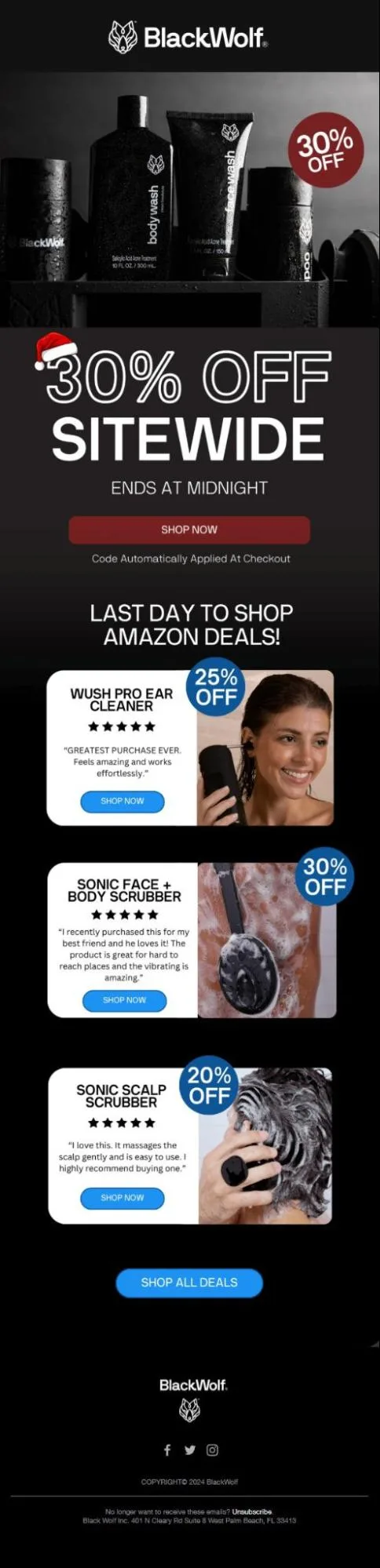
Deadlines work best when they sit beside the thing they limit. For Black Wolf’s last chance send, we placed the end time with the discount.
Why we love it:
- We include “Ends at Midnight” directly below “30% Off Sitewide,” let subscribers take in the offer and the deadline together.
- Our email had a separate “Last Day to Shop Amazon Deals” section so shoppers know which discounts live where.
- Each Amazon product pairs its own discount (25%, 30%, and 20%) with a five-star customer quote at the point of decision.
What to adopt:
- The design mustn’t overpower the discount, deadline, and codes.
- Send the email in the morning and again a few hours before the deadline.
CTA: CTA: “Shop Now” sits under the deadline; each product card has its own button.
Black Friday Sale Extension Email
A sale extension email tells subscribers the offer continues through Cyber Monday or another set date.
A missed sale does not have to feel like a scolding. For Original Grain, we wrote a second-chance email that jokes it witty and simple.
Why we love it:
- Our email content matches the brand’s relaxed tone and acknowledges the miss without pressure.
- We lead with three best-selling collections that put proven demand in front of subscribers who did not buy the first time.
- From our experience, a five-star review from a customer convinces more than a benefit list.
What to adopt:
- Send extensions only to subscribers who have not yet purchased.
- Put the saving in the button wherever the offer is a fixed amount.
- Close with a review for social proof and lessen buyer’s remorse.
CTA: CTA: We open the email with“Shop What’s Still On Sale,” and each collection has its own button with the saving or an invitation to explore.

Countdown Timer Black Friday Email
A countdown timer email shows subscribers exactly how much time remains before an offer ends.
Since time carries the most weight in this email, we placed Soccer Wearhouse’s timer above the “Save up to 75%” headline so subscribers see it before anything else.
Why we love this:
- We used this email near the end of a sale window, when a real deadline gives subscribers a reason to act.
- The product sections follow a ladder: “Most Wanted Gear” shows proven demand, “Gear That Goes Fast” adds scarcity, and “Everything Is Up to 70% Off” invites browsing.
What to adopt:
- Repeat your code at the top and the bottom.
- Order product sections from proof to scarcity to breadth.
CTA: CTA: “Shop Black Friday” opens the offer.

Sustainability and Conscious Black Friday Email
A conscious Black Friday email connects your sale to values that matter to your audience.
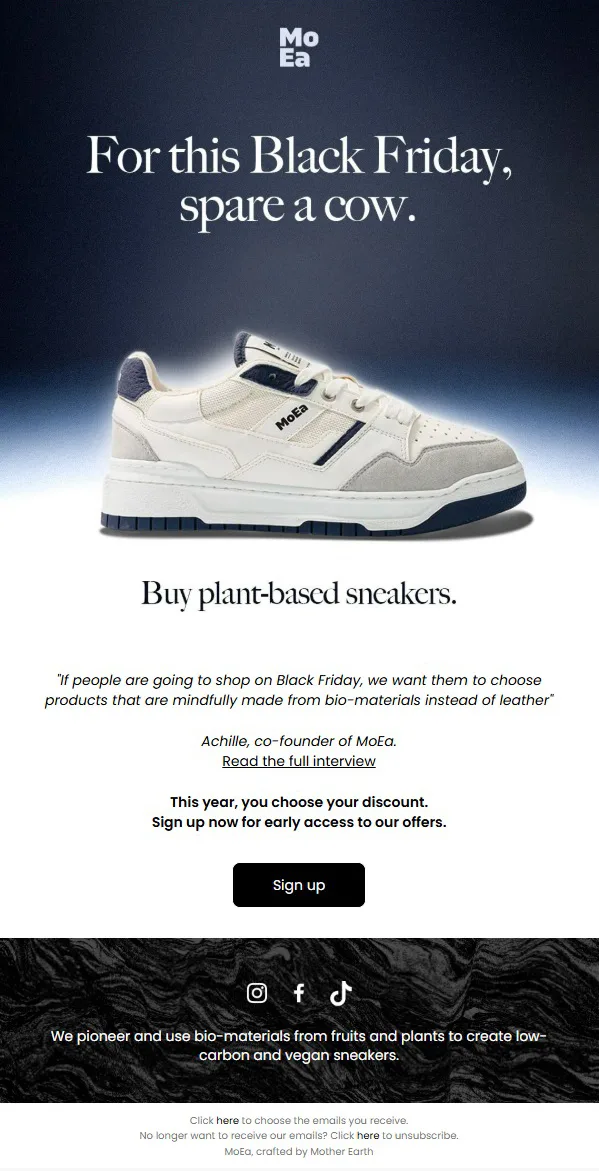
Values-led emails earn trust when they back the claim with a source. For MoEa, we opened with a position and let the founder explain it.
Why we love it:
- We added a quote from co-founder Achille with a link to the full interview, letting skeptical readers verify the claim.
- Our email invites subscribers to sign up for early access, which builds an interested audience before the sale begins.
What to adopt:
- Back each environmental claim with a specific fact and a link to proof, such as a certification or an impact page.
- Name the materials, processes, or numbers behind your claim.
- Use a sign-up as your first conversion when the sale details are not ready, then send those subscribers the offer first.
One “Sign up” button follows the early access line, which keeps the next step clear.
Social Proof Black Friday Email
Black Friday emails use customer voices, star ratings, or live buyer statistics to cut through inbox noise.
For AeroPress, we put a customer’s words beside every product in the sale.
Why we love it:
- We made sure each product sits beside a quote from a named customer with a star rating, so the proof is attached to the item the shopper is considering.
- We extended the window past Black Friday to give shoppers room to decide.
- Our email includes “55,000+ five star reviews” across 60 countries adds scale for readers who are new to the brand.
What to adopt:
- Match each review to the exact product it sits beside.
- Secure permission before you feature any customer name, photo, or quote, and use verified buyers.
- For products that need explaining, add a short how-it-works sequence before the discount.
CTA: CTA: Every proof block ends with a “Shop Now.”

When Is The Best Time To Send Your Black Friday Emails?
The best Black Friday email schedule starts one to two weeks before the sale and continues through Cyber Monday. Black Friday falls on November 27, 2026, and Cyber Monday falls on November 30.
Two weeks before (around November 13): Send the teaser and save-the-date emails.
Week of Black Friday (November 23 to 25): Send early access emails to VIPs, loyalty members, and SMS subscribers.
Thanksgiving Day (November 26): Send a light, helpful message or a brief announcement of the next morning’s sale.
Black Friday (November 27): Send the main announcement in the morning, then a reminder later in the day.
Weekend (November 28 and 29): Send a deals roundup and low-stock messages.
Cyber Monday (November 30): Send the extension or last chance emails, with a final reminder in the evening.
Note: For time of day, we recommend testing morning sends first, since subscribers often check email before they shop.
- We schedule sends in each subscriber’s local time zone when your platform allows it.
- Test send times, because audience habits vary by industry and region.
Black Friday Email Marketing Campaign Best Practices
A strong Black Friday email campaign starts with a segmented list, a clear offer, and a planned schedule that runs from the teaser through Cyber Monday. Each email then carries one purpose, one primary button, and a design built for mobile.
Segment Your Audience for Targeted Messaging
Segmentation sends each group the message that fits them. Split your list by purchase history, engagement level, and customer value. A VIP buyer and a first-time subscriber need different offers.
Utilize a Black Friday Email Template
A reusable template speeds up production during a busy season. We build modular blocks for the hero offer, product grid, countdown, and footer. Our designers create these blocks once, so the team can swap content quickly for each send.
Our AI Email Writer allows brands to generate scroll-stopping email copy and tailor it according to industry, purpose, and audience.
Craft Compelling Subject Lines
A strong subject line states the offer or the benefit in a few words. We keep it under 50 characters so it displays fully on mobile. Our emails pair it with preview text that adds a second detail, such as the deadline.
InboxArmy offers free Email Subject Line Generator and Email Subject Line Tester tools to create and analyze compelling emails.
Black Friday Email Subject Line and Preview Text Examples
| Subject Line | Score |
|---|---|
| {{firstName}}, Your Black Friday Preview is Here Preview upcoming deals and plan your shopping now. |
74% |
| Mark Your Calendar: Black Friday is Coming Don’t miss out on our biggest sale of the year. |
72% |
| Don’t miss your last shot at Black Friday savings Shop now before these deals disappear for the year. |
73% |
Personalize Your Email Content
Personalization goes beyond a first name. We use browsing behavior, past purchases, and loyalty status to select the products and offers in each email. Our email marketers always include a fallback, such as bestsellers or featured products, for subscribers without data.
Create Urgency With Time-Sensitive Offers
Time-limited offers give subscribers a reason to act now. We state the real end date and time in plain text. From our experience, real deadlines build credibility, and credibility keeps urgency working across future sales.
Plan Your Email Schedule Strategically
A planned schedule prevents list fatigue and avoids overlap between campaigns. Our marketing specialists map every send on one calendar and assign each email a single purpose. We give less engaged subscribers fewer emails than your most active segments.
Use Visual and Interactive Elements
Visual elements make a sales email easier to scan. We include product grids, bold hero images, and countdown timers. Interactive features like accordions or hover effects work in some email clients, so always provide a simple fallback.
Extend Your Black Friday Email Campaign Until Cyber Monday
A longer campaign captures subscribers who were not ready on Friday. Plan a weekend deals email and a Cyber Monday message with a fresh angle. Send extension emails only to subscribers who have not yet purchased.
Coordinate Emails With Push Notifications and SMS
Email, SMS, and push work best as one connected plan. At InboxArmy, we use SMS for time-sensitive alerts like early access and last chance reminders. Emails are for richer storytelling and product detail. We share suppression logic across channels so a customer who purchased stops receiving reminders everywhere.
Post-BFCM Retention and Re-Engagement Strategy
A post-BFCM strategy turns one-time deal shoppers into repeat customers. Start with a thank-you and order-confirmation sequence that shares care tips and sets expectations for delivery. Then build a segmented follow-up flow for new buyers, and send a re-engagement series in January to subscribers who opened sale emails but did not purchase. Subscribers who still do not respond after that series move into a sunset segment, which protects your sender reputation going into the new year.
Black Friday Email Mistakes Marketers Must Avoid
Successful Black Friday email campaigns avoid blasting the same email across the email list, ignoring abandoned cart emails, and addressing deliverability issues in transactional emails.
Blasting Instead of Segmenting
Sending one message to the whole list lowers relevance and raises unsubscribe rates. So we split our email list into at least three groups, such as VIPs, engaged subscribers, and low-engagement subscribers, and tailor the offer and frequency for each.
Black Friday Email and Landing Page Mismatches
A mismatch happens when the email promises one offer, and the landing page shows another. Shoppers leave when the price or product differs from what they clicked. At InboxArmy, we link every email to a page that repeats the same offer and test each link before sending.
Ignoring Abandoned Cart Emails
What we’ve seen across our ecommerce clients, skipping abandoned cart emails leaves recoverable revenue unclaimed during your highest-traffic week. We confirm the email flow is live, tested, and aligned with the sale offer before November begins.
Transactional Email Deliverability Issues
Order confirmations and shipping notices spike during Black Friday, and delivery problems frustrate new customers. We send transactional emails from an authenticated domain and consider a separate sending stream from promotional emails so a promotional spam complaint spike does not affect order messages.
Track Metrics That Drive Black Friday Emails
Brands can use conversion rate, click-through rate, revenue per recipient, average order value, return on investment, and unsubscribe rate to gauge the success of Black Friday email campaigns.
Conversion Rate and CTR
Conversion rate measures the share of recipients who buy, and click-through rate (CTR) measures the share who click. These two metrics show whether your offer and your design drive action. We weigh them above open rate because Apple’s Mail Privacy Protection has made opens unreliable.
Revenue Per Recipient (RPR)
Revenue per recipient equals total email revenue divided by the number of recipients. RPR shows which emails and segments earn the most per send. Compare RPR across segments to decide where to focus your next sale.
Average Order Value (AOV)
Average order value equals total revenue divided by the number of orders. Bundles, free gift thresholds, and tiered discounts all aim to raise AOV. Track AOV by email type to see which offers lift basket size.
ROI and Unsubscribes
ROI compares the revenue your email program earns against the cost of running it. Unsubscribe rate shows whether frequency and content match subscriber expectations. A rising unsubscribe rate during the sale signals that you should cut frequency for your less engaged segments.
FAQs
When should I start planning my Black Friday email campaign?
Start planning eight to ten weeks before Black Friday. That timeline leaves room for list cleanup, template design, offer decisions, and testing before the inbox gets crowded.
How many emails should I send during Black Friday weekend?
Most engaged subscribers can handle one to two emails per day from Black Friday through Cyber Monday. Send fewer to low-engagement segments, and give each email a distinct purpose.
What’s the best discount percentage for Black Friday?
The best discount depends on your margins, your category, and your competitors. No single percentage works for every brand, so test two or three offer types, such as a percentage off, a gift, and a bundle, and compare revenue per recipient.
Should I segment my Black Friday emails or send the same message to everyone?
Segment your emails. Different groups respond to different offers, and segmentation improves relevance while lowering unsubscribes.
How do I make my Black Friday emails stand out in crowded inboxes?
Use a clear subject line, strong preview text, and a recognizable sender name. Send early, vary your design from the sale emails around you, and lead with one offer that is easy to understand.
When should I start sending Black Friday emails?
Start sending one to two weeks before Black Friday. Begin with a teaser or save-the-date email, then move to early access and the main announcement.
What makes a good Black Friday email?
A good Black Friday email states one clear offer, shows a single primary button, and displays well on mobile. It also uses a real deadline and links to a landing page that matches the offer.
What is the best Black Friday email subject line?
The best subject line states the offer and the deadline in a few words. These examples work as starting points. Early access starts now: 20% off Black Friday starts tonight Your sale ends at midnight Free gift with every order today Last chance: Cyber Monday deals end soon
Can I send more than one Black Friday email a day?
Yes, you can send more than one email a day to engaged segments when each email has a different purpose. Watch your unsubscribe and spam complaint rates, and reduce frequency for any segment where those numbers climb.