

I have had this conversation with clients more times than I can count. Someone reads that dedicated IPs are “more professional” or hears a competitor switched, and suddenly the question lands on my desk: Should we move off-shared?
More often than not, the answer is no. Not because dedicated IPs are bad, but because the team asking is not yet in a position to benefit from one. The choice tends to matter most after volume climbs, sending schedules stabilize, and someone on the team is actually responsible for reputation management day to day.
Here is how I think through it.
What Does an IP Address Do in Email Delivery
Every email leaves your server with an IP address attached. Mailbox providers read that address before they read anything else. Over time, the traffic history tied to that address builds into a reputation score that influences email deliverability, whether it lands in spam or gets blocked outright.
IP reputation is not the primary trust signal anymore. Domain reputation took over that role as mailbox providers got more sophisticated. But IP still matters, particularly when volume is high, when something goes wrong, or when you are trying to get onto a B2B safelist.
Engagement, complaints, bounces, and volume patterns are tracked and analyzed using an email deliverability test, and that history influences how future emails are handled.
The choice between shared and dedicated determines who controls that IP history and who is responsible for managing it.
Shared vs. Dedicated IP Addresses: Feature Comparison for Email Marketers
| Feature | Shared IP | Dedicated IP |
| Reputation ownership | Pooled across multiple senders | Yours alone |
| Security | Depends on how strictly the ESP vets users | Highest: supports whitelisting, compliance, and stream isolation |
| Delivery speed | Can slow if the shared pool is overloaded | Stable and predictable |
| Scalability | Works well for lean, steady sending | Built for aggressive volume growth |
| Best deliverability fit | Small to mid-volume senders | Consistent, high-volume senders |
| Cost | Usually included in base ESP plans | Typically $2 to $5 per month at most providers, higher at some |
| Maintenance burden | ESP handles it | You handle it |
| Warm-up required | No | Yes, typically 2 to 4 weeks |
| Best for | Low-volume senders, early-stage programs | High-volume senders, established programs |
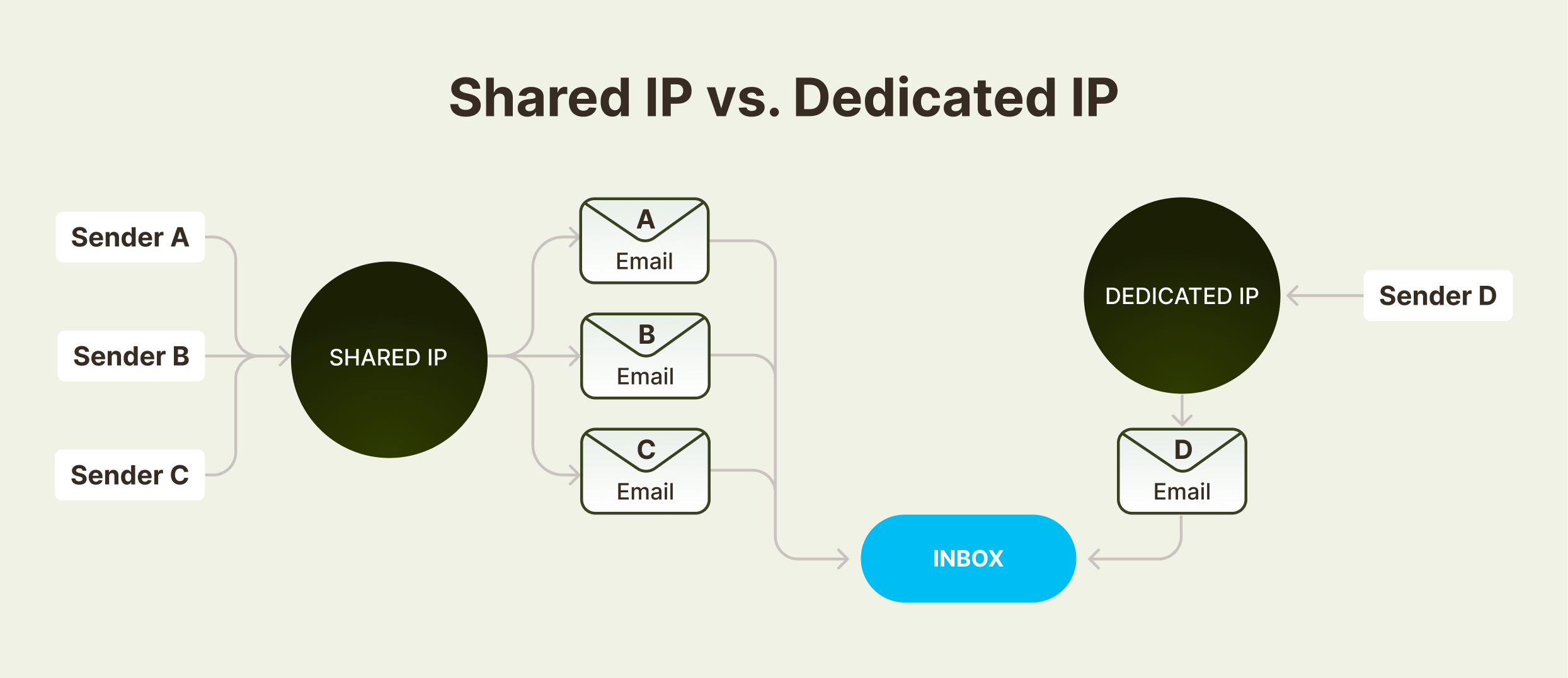
What Is a Dedicated IP Address for Email
Full Control Over Your Sender Reputation
On a dedicated IP, every engagement, every complaint, every bounce traces back to your sending behavior alone. No other senders are in the picture. That matters for teams sending large volumes or running high-value streams like transactional email.
When something goes wrong, you know exactly what caused it. When something works, you know why.
Isolation from Other Senders
On a shared IP, another user’s bad sending day can affect your delivery. A dedicated IP removes that exposure entirely. One IP, one sender, clean separation.
I have seen teams spend weeks troubleshooting a deliverability issue only to find the root cause was another user on the same shared pool. Isolation eliminates that variable.
More Predictable Transactional Email Delivery
Password resets, order confirmations, and account alerts: these cannot wait and cannot fail. A dedicated IP keeps these streams insulated from the noise of marketing sends or any other traffic that might introduce reputation pressure.
Greater Sending Infrastructure
Many ESPs and hosting providers allow greater configuration flexibility on dedicated IPs, including support for multiple SSL certificates, cleaner DNS record management, and easier handling across multiple sending domains. For teams managing several sending identities, this simplifies a lot.
Disadvantages of a Dedicated IP Address
New Dedicated IPs Start with No Sending History
A new dedicated IP has no history. Mailbox providers watch it closely. Volume spikes during early sends, inconsistent scheduling, and list quality problems can damage trust quickly and set back the program for weeks.
Warming a dedicated IP is not optional. It requires a structured ramp, close monitoring, and patience. Teams that skip this step almost always regret it.
Low-Volume Senders Often Perform Worse on a Dedicated IP
Dedicated IPs need steady traffic to maintain reputation signals. A sender pushing a few thousand emails a month does not generate enough consistent activity to build a strong IP reputation. Shared IPs keep those signals alive by pooling traffic from multiple senders.
If your volume is low or inconsistent, a dedicated IP is more likely to hurt than help.
Dedicated IPs Require Active Reputation Management
Monitoring, ramp planning, blacklist remediation, and reputation recovery: all land on your team with a dedicated IP. There is no shared buffer. If something breaks, no one else will fix it.
What Is a Shared IP Address for Email
Benefits of a Shared IP for Email Marketing
Most ESPs include shared IPs in their base plans. There is no additional monthly fee, no warm-up schedule, and no ramp required. You can start sending on day one.
For startups and smaller businesses that need to move quickly without adding operational overhead, that matters.
Lower Cost and Faster Setup
Shared IP pools are already warmed. Mailbox providers have a traffic history to evaluate. For low-volume senders, this means better inbox placement faster than they could achieve on a cold dedicated IP.
ESP Handles Reputation Management
Your ESP monitors the shared pool, manages blacklist removals, and handles reputation remediation. Your team focuses on content, targeting, and strategy instead of deliverability infrastructure.
Works Better for Seasonal or Irregular Sending
On a dedicated IP, sending only during the holidays and going quiet the rest of the year creates reputation gaps that are hard to recover from. Shared IPs handle irregular sending patterns much more gracefully.
Disadvantages of a Shared IP Address
Other Senders Can Affect Your Deliverability
If someone on the same shared pool sends to bad lists, generates high complaint rates, or triggers a blacklist, that affects your IP reputation, too. The best ESPs vet shared pool users carefully and act quickly on abuse. The worst ones do not. Ask your provider how they manage this before you commit.
Deliverability Troubleshooting Takes Longer
When delivery problems appear on a shared IP, diagnosing the root cause is harder. You are looking at a pool of traffic you do not fully control. Good logging on your end and a responsive support team at your ESP become more important.
B2B Safelisting Is More Complicated on a Shared IP
Enterprise security teams often want to whitelist specific IP addresses for reliable delivery. That is much harder to do with a shared IP that changes over time or is used by many senders. If B2B deliverability is important to your program, a dedicated IP is worth the overhead.
High-volume senders can slow the pool
When other users on the shared pool send large batches, it can affect delivery timing for everyone on that IP. If consistent timing matters for your sends, a shared environment adds a variable you cannot control.
Dedicated IP vs. Shared IP: How to Choose the Right One
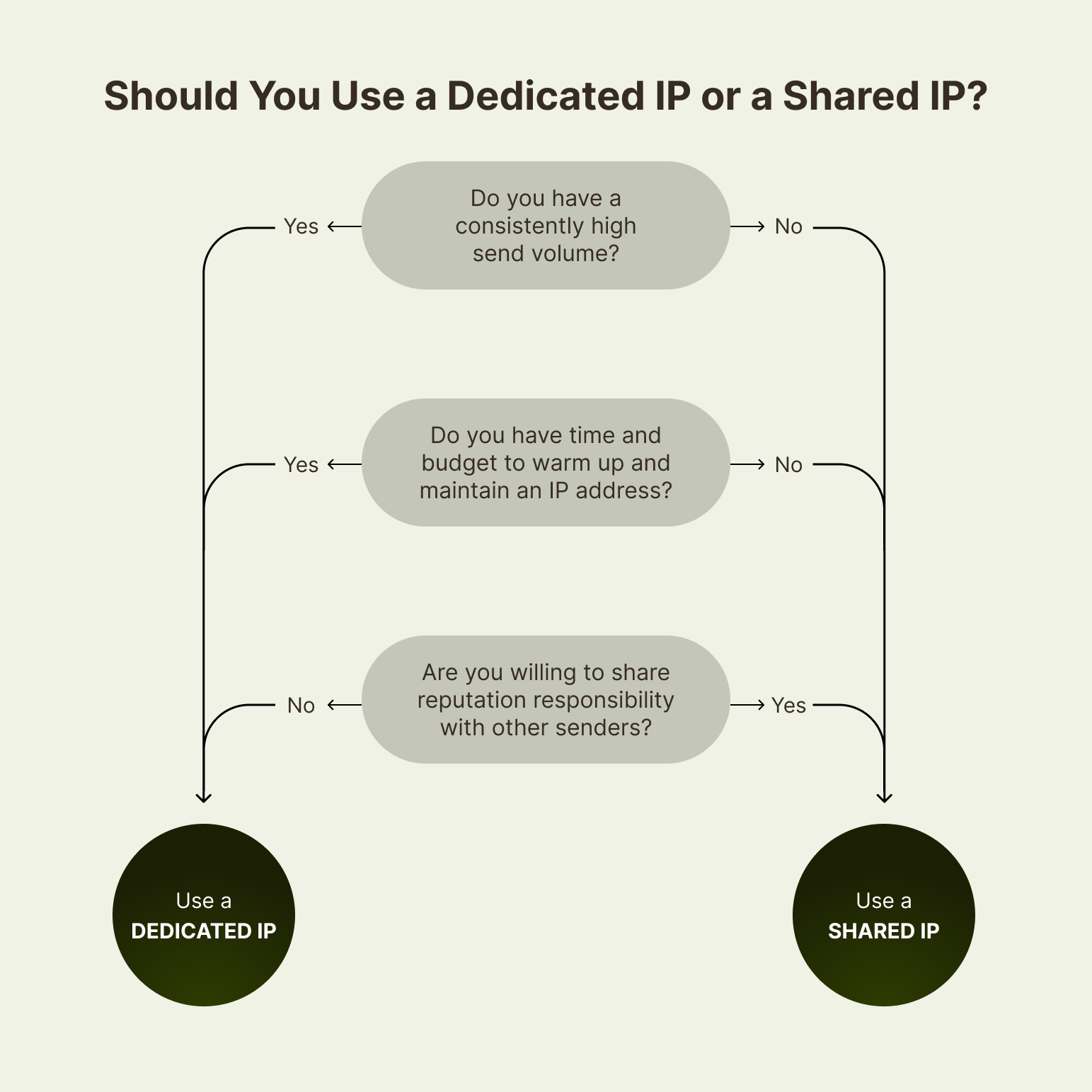
I use a short set of questions with clients when we hit this decision:
Questions to ask before choosing a dedicated IP:
- Are we sending on a consistent schedule every week?
- Is our monthly volume high enough to generate steady reputation signals (typically 100,000 or more emails per month)?
- Do we have someone responsible for monitoring reputation and responding when something goes wrong?
- Are we running mission-critical streams, such as transactional email, that cannot share traffic with marketing sends?
- Do we need predictable B2B deliverability with specific IP whitelisting?
If the answers to most of those are yes, a dedicated IP is worth serious consideration.
Signs You Should Stay on a Shared IP
- Are we still building our list or scaling up slowly?
- Is our sending volume under 100,000 emails per month, or is it inconsistent month to month?
- Does our team have limited bandwidth for deliverability monitoring?
- Do we rely on our ESP to handle reputation management for us?
- Are we launching a new program without an established sending history?
Most teams I work with fall into the shared IP camp longer than they expect. That is not a failure. It is just an honest read of what their program actually needs.
When to Reconsider Your IP Setup
This is the part most teams miss. They make the call once and forget to revisit it as their program grows. Here is what I tell them to watch for:
Signs You Have Outgrown a Shared IP:
- Volume is climbing consistently past 100,000 emails per month
- You are starting to separate transactional and marketing traffic
- B2B deliverability is becoming a real part of the business
- You have the team or partner bandwidth to manage reputation actively
Signs a Dedicated IP Is Working Against You:
- Inbox placement has declined since moving off shared
- You warmed the IP, but volume dropped, and the reputation never fully recovered
- Your team is spending more time on deliverability firefighting than on strategy
The mistake I see most often at our email marketing agency is holding onto the wrong IP type after the program has changed. That is when quiet reputation erosion starts, and delivery problems show up without an obvious cause.
If you want help evaluating dedicated IP vs shared IP, warming a new IP address, or fixing IP-level deliverability problems, InboxArmy’s email deliverability consulting can help.
Dedicated IP vs Shared IP FAQs
Is a dedicated IP safer than a shared IP?
It can be. With a dedicated IP, you have full control over your sender reputation and no exposure to other users’ sending behavior. But safety depends on how you manage it. A dedicated IP with poor list hygiene or irregular sending can perform worse than a well-managed shared pool.
What is the real cost difference?
Most ESPs charge between $2 and $5 per month for a dedicated IP, though some providers charge significantly more depending on the plan. The harder cost to quantify is the operational overhead. Someone needs to manage warm-up, monitor reputation, and respond to issues. Factor that in before making the switch.
What are the downsides of a dedicated IP?
New dedicated IPs require a warm-up period of 2 to 4 weeks with carefully controlled volume increases. Low-volume senders often struggle to maintain a healthy sender score. And any reputation problem is entirely your problem to solve, with no shared buffer.
What volume justifies moving to a dedicated IP?
There is no exact threshold, but most deliverability practitioners start recommending dedicated IPs around 100,000 emails per month, provided the sending schedule is consistent. Volume alone is not enough. Consistency and list hygiene matter just as much.
Can I use both?
Yes, and many established programs do. Transactional email often runs on a dedicated IP for isolation and reliability, while marketing sends use a shared pool. This separation protects critical streams without requiring full operational ownership of every IP address in the program.